
 Portugues
Block Coding Games
Saved games stay in this browser only.
About the games
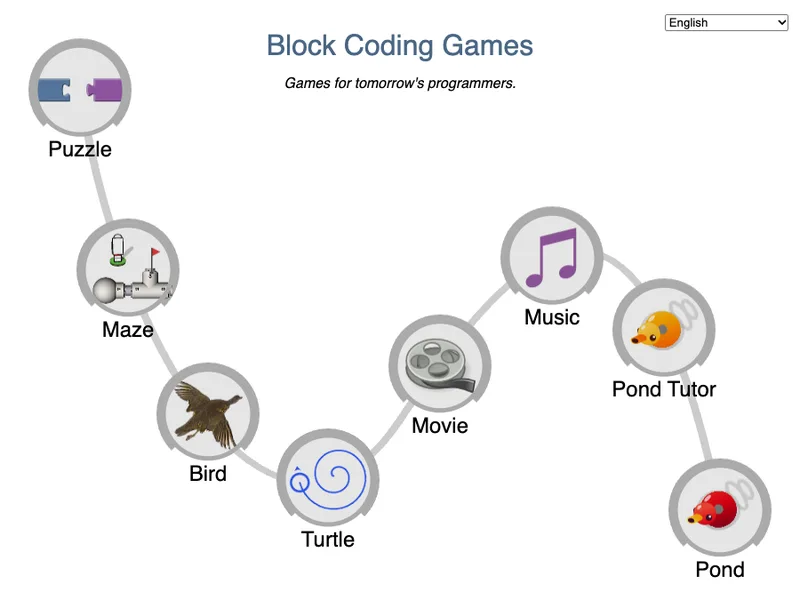
Block Coding Games is a collection of eight small games for learning to program. In every one of them you build a program by snapping together colourful blocks, press a button, and watch what the program does. Six of the games have ten levels, and every level adds one idea: the first ones need a couple of blocks, and the last ones ask you to combine loops, conditions, variables and functions on your own. You can move freely between levels with the numbers at the top of the screen. Puzzle and Pond are a single challenge each.
The collection is based on Blockly Games, an open source project by Neil Fraser at Google that teaches programming in the browser with the Blockly block editor. This is a modified copy of its offline version, with the games unchanged apart from the changes listed in the credits below.
The eight games
Puzzle is the gentlest start: for each animal, attach its picture, choose how many legs it has and stack the blocks for its traits, so you learn what a block is and how blocks fit together.
Maze asks you to guide a little explorer through a maze with blocks that move and turn. It starts with a straight line and builds up to loops that repeat until you reach the goal, and conditions that decide what to do at each fork. You can choose between two characters.
Bird gives a bird a worm to find and a nest to fly to. Conditions, comparisons and loops guide its path across ten levels.
Turtle is a drawing game. You tell a turtle to move and turn, and it leaves a line behind. The levels teach repeating, then nesting loops, then functions, and ask you to draw spirals, flowers and your own pictures.
Movie is an animation game: you write a function that draws what happens on screen, with its own variables and maths, to match the picture in the reference movie as time passes.
Music lets you compose tunes by building the notes, rests and instruments from blocks, with loops and functions to repeat the parts of a song.
Pond Tutor introduces text programming. The levels go back and forth between blocks and the same program written as JavaScript in a text editor, so you see how one turns into the other.
Pond is the final game: write a program, in blocks or in JavaScript, that controls a duck in a pond fight, and try it against built-in opponents.
Playing it here
Click Play and the games menu appears. Click any game to start it. Your progress is kept in your browser, and the menu shows how far you have got in each game. Drag blocks from the left of the workspace, press Run Program to see what your program does, and use the numbers at the top to go to another level. The language menu switches between English and Portuguese.
Controls
| Input | Action |
|---|---|
| Mouse drag or touch | move blocks from the toolbox into the workspace and snap them together |
| Run Program button | run the program; Reset stops it |
| Level numbers at the top | go to another level |
| Language menu | English or Portuguese |
| Keyboard | type in the text editor of the Pond games and edit block fields |
A few things worth knowing
Read the blue bubble. Each level opens with a short hint that shows what is new. You can close it and open it again from the Help button.
You can always step back. The program you built stays in each level when you leave it, and a level you have finished keeps its mark in the level bar.
Maze has no Pegman. The original Maze offers a third character from a maps product; it is not included here, and the two remaining characters play exactly the same.
Credits and licence
This collection is based on Blockly Games by Google, an open source project created by Neil Fraser and its contributors, released under the Apache License 2.0. The code and graphics are served as they were published, built from the source of the project, with the following changes of ours: the collection is called Block Coding Games instead of Blockly Games, and the original name and logo were taken off the pages; only English and Portuguese are included; the Maze game has no Pegman character and its two photographic backgrounds (third-party photos credited to other people) were replaced by plain colours, with a new goal flag and menu icon drawn by us; the gallery, the saved-link feature, the "about" page and the analytics code were removed, and the Help links that opened other websites from the block menu were turned off, so that nothing is requested from other websites. We are not affiliated with or endorsed by Google, and the name Blockly Games and the Google name are not used under any trademark licence.
Inside the games: Blockly and JS-Interpreter (Apache License 2.0), SoundJS (MIT), the Ace editor (BSD licence), Babel (MIT) and Acorn (MIT). The instrument sounds in Music are samples from the FluidR3 soundfont (from the midi-js-soundfonts project, Creative Commons Attribution 3.0) and the Salamander Grand Piano by Alexander Holm (Creative Commons Attribution 3.0). The licence texts, the credits and the complete source of this build, with our patch and the build script, are linked from this page.