
 Portugues
Dragon Tax Return Simulator 2015
Saved games stay in this browser only.
About the game
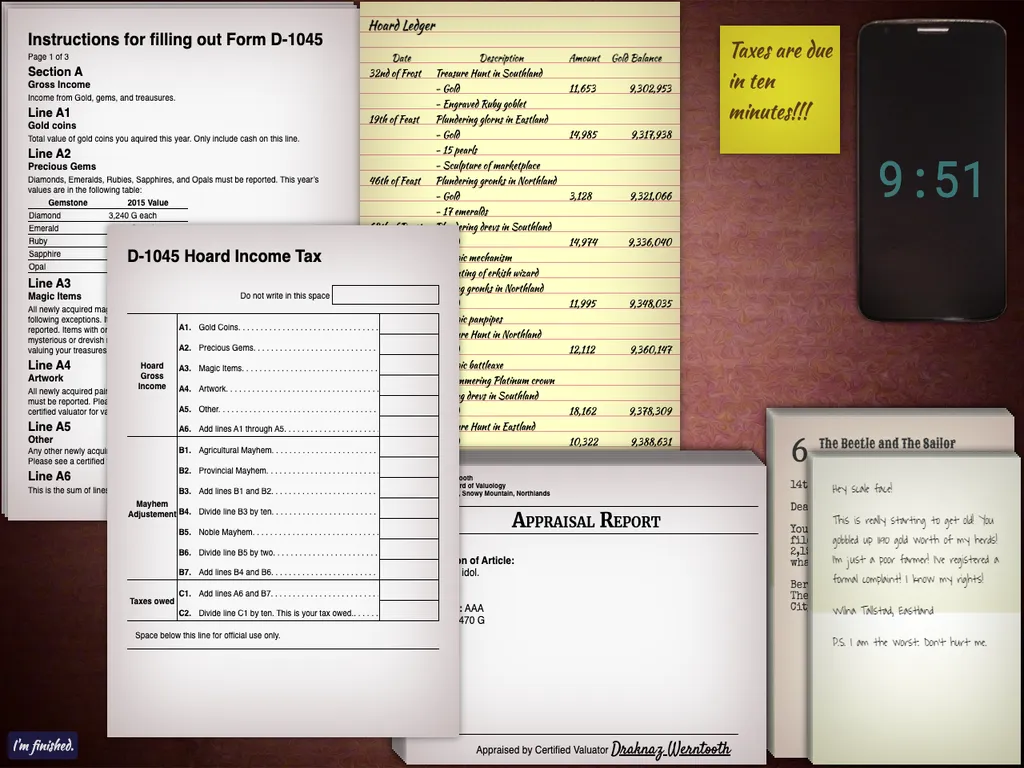
In a world of erks, drevs, gronks and glorns, the dragons live high in the mountains and the High Dragon Council taxes their hoards. You are an average dragon who has procrastinated once again, and the council's courier will arrive in ten minutes to collect your tax forms. A yellow sticky note and a phone with a countdown tell you how long you have left.
On the desk in front of you there are papers that you can drag around with the mouse. The main one is your D-1045 Hoard Income Tax form, which asks you to add up your gold coins, gems, magic items and artwork, to work out how much mayhem you caused to farmers, provinces and nobles, and to divide the total by ten to find the tax you owe. The numbers come from the Hoard Ledger, a list of raids with dates, amounts and treasures, from the appraisal reports that value each object, and from the complaint notes that angry farmers, nobles and shopkeepers have sent you, each on its own letterhead, with its own handwriting, and with its own number of gold pieces' worth of damage. Every run shuffles all of it.
The game is a lot of arithmetic against a clock, with a good deal of silliness around it. When you press "I'm finished." or when the courier arrives, a friend of yours who is a professional dragon accountant looks over your return and gives you an assessment: a breakdown of which lines you got right, and tips on where you went wrong. If you need more time, you can beg the courier for five more minutes.
Matt Walsh made it in 72 hours for Ludum Dare 33 and kept improving it afterwards, with a claw-shaped cursor, a detailed final report and new letterheads. A pen, a piece of paper and a calculator are recommended.
Playing it here
Click Play, read the introduction in the game and press "I'm ready!" to start the clock. Click on a field of the form to type a number, and drag any paper by its body to move it out of the way or bring it closer. The game works with the mouse and the keyboard. Nothing is sent anywhere.
Controls
| Input | Action |
|---|---|
| Drag with the mouse | move a paper around the desk |
| Click on a field and type | fill in the form |
| "I'm finished." button | hand in the return and get your assessment |
A few things worth knowing
Follow the form line by line. Every line says exactly what to add or divide; the hard part is finding the right numbers on the right paper.
Keep the ledger and the reports close. You will go back to them often, so pile the papers you do not need on the side.
Check your arithmetic twice. A wrong figure early on spreads to the lines that depend on it, and the final report shows you where that happened.
Credits and licence
Dragon Tax Return Simulator 2015 was made by Matt Walsh (walsh9) for Ludum Dare 33 and published under the MIT licence. It uses jQuery 3.2.1 and jQuery UI 1.12.1 (MIT) and handlebars 3.0.3 (MIT), and twelve fonts from Google Fonts: Shadows Into Light, Waiting for the Sunrise and Annie Use Your Telescope by Kimberly Geswein; Kaushan Script by Pablo Impallari and Igino Marini; Miltonian Tattoo by Pablo Impallari; Roboto Mono by Christian Robertson; Satisfy by Sideshow; Great Vibes by TypeSETit; Merriweather by Eben Sorkin; Special Elite by Astigmatic; Rye by Nicole Fally; and Sancreek by Vernon Adams. They are under the SIL Open Font License 1.1 or the Apache License 2.0, and their licences are linked from this page. The changes made for this site are: the libraries and fonts are served from the game folder instead of from other sites, and a decorative symbol that used the TypoBackgrounds font by Manfred Klein, which has no licence, is hidden.