
 Portugues
Evaluation Order
Saved games stay in this browser only.
About the game
Evaluation Order is a puzzle game for anyone who has ever stared at a line of Lisp and wondered what it turns into. The story opens with a programmer who falls asleep at the REPL and dreams of expressions. In the dream you are shown a piece of code, for example (+ 1 pi (* 3 4)), and a target value. Your job is to evaluate it step by step until it becomes exactly that value.
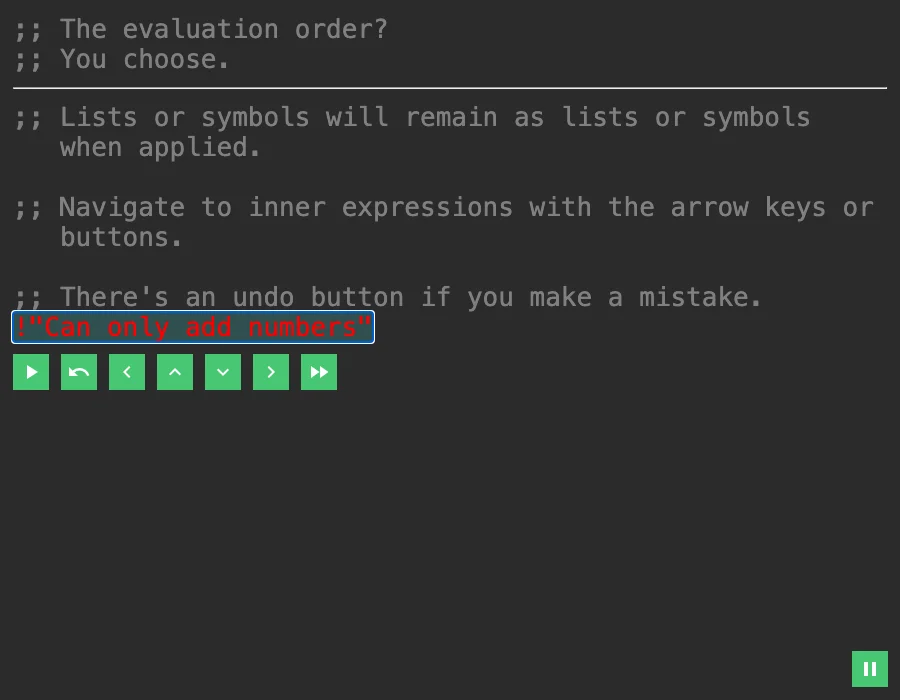
The catch is that you decide the order. Evaluating the outer addition first does not work, because you cannot add a list or a symbol that has not been resolved yet, and the game answers with a red error. Evaluate the inner (* 3 4) first, then replace pi by its number, and the sum falls into place. Later puzzles bring lists, first and next, if, anonymous functions with fn, and finally recursion, written with the Y combinator, where the puzzle is to pick the right subexpression every time so that the whole thing collapses to the answer.
It reads as a short interactive story, with a line of text appearing every second or two, and then a real puzzle in the middle of it. The levels are grouped as Introduction, Further Functions, Recursion and More Puzzles, and each group unlocks after the one before. There is also a level editor where you can write your own expression and target. The jam entry was made by eutro for the Spring Lisp Game Jam 2021.
How to play
Press Enter, or the green play button, to evaluate the part of the expression that is highlighted. Move the highlight with the arrow keys: left and right between neighbours, up to the enclosing expression, down into an inner one. The fast-forward button skips the puzzle if you are stuck. If you make a mistake, press Ctrl+Z or the undo button. Esc opens a pause menu. The story pauses at a small arrow, and Enter continues it.
Your progress, the music and effects volume and the colour theme are saved in this browser. The game works on a phone, since every key has a button on the screen, but a keyboard is more comfortable.
Tips
Evaluate from the inside out. If the highlighted part contains something that is not a plain value yet, step into it before you evaluate.
Read the error. The message in red tells you what the function did not like, such as trying to add something that is not a number.
Keep the target in mind. The value you are aiming for is shown with the puzzle; work backwards from it when the expression is long.
FAQ
Do I need to know Lisp? The first levels teach everything you need, one idea at a time, but the later ones are much easier if you already read parentheses.
Is there music? Yes, two short loops, and the volume of music and effects can be changed under Options. Your browser may ask for a click before it plays sound.
Can I make my own puzzle? Yes, open Level Editor in the main menu.
Credits and licence
Evaluation Order was made by eutro (Beatrice Szilvasy) for the Spring Lisp Game Jam 2021. The code is under the MIT licence and, according to the author, the assets (text, music and sound effects) are released under Creative Commons Zero (CC0). The icons are Google's Material Icons font (Apache License 2.0), which we host ourselves, and the game uses ClojureScript, Reagent and React, all listed with their licences next to the build. We changed two things: the progress and settings are stored in the browser's local storage instead of cookies, and we removed the link to the project's GitHub page. The source of this build, the patch and the build script are linked from this page.