
 Portugues
Gatepaint
Saved games stay in this browser only.
About the game
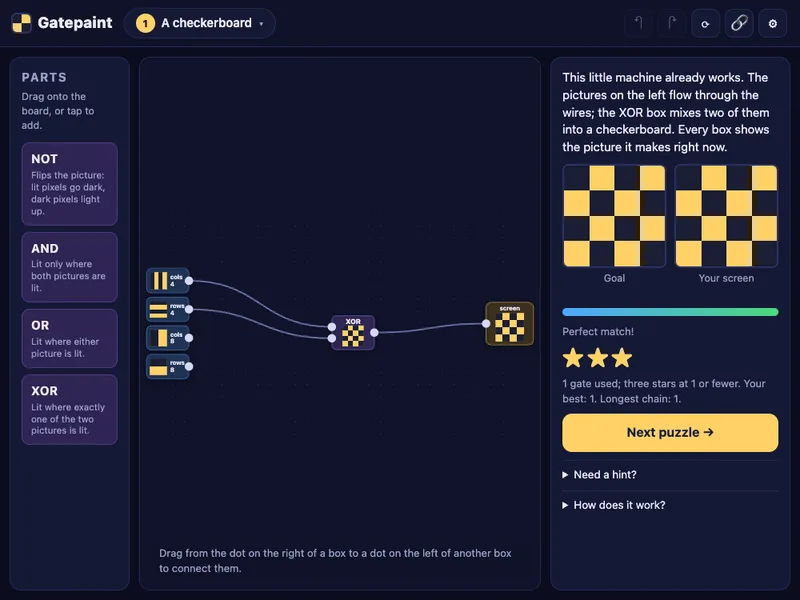
Gatepaint is a puzzle about logic gates with a twist: nothing on the board is a single on/off signal. Every wire carries an entire picture, a grid of 16 by 16 pixels. You start with a few ready-made pictures (stripes of different widths, the left half of the screen, the bottom half) and combine them with gates. An AND gate keeps the pixels that are lit in both of its inputs, OR keeps the pixels lit in either, NOT flips a picture, and XOR lights the places where two pictures disagree. Each box shows the picture it makes right now, so you see the effect of every wire the moment you plug it in.
Your job is to build a machine whose output matches the goal picture shown on the right. It is also, quietly, a lesson in how graphics chips work: one tiny program runs for every pixel at the same time.
Playing it here
Click Play and the first puzzle is already a working machine, two striped pictures going into an XOR gate and coming out as a checkerboard. Pull a wire off, move a box, and press Next puzzle when you are ready.
There are 16 puzzles, and they build up slowly. The early ones use the halves of the screen and a single gate; later ones bring in XOR, NOR and XNOR, then three colour channels that mix into eight colours, and finally goals that animate, where your machine is checked on every frame. After them comes a free paint mode with every part unlocked.
Each puzzle has a par, the number of gates in a tidy solution. Solving it earns one star, staying within two gates of par earns two, and matching par earns three. Puzzles open one after another. If you are stuck, the hint under the goal tells you which gate to look for.
Your progress, the machine you were building in each puzzle and your settings are kept in your browser. The gear button has options to mark wrong pixels on your screen, turn the sounds off and change the animation speed. The chain-link button copies a link that reopens your exact machine.
Controls
| Input | Action |
|---|---|
| Drag from a box's right dot to another box's left dot | connect a wire |
| Drop a wire on the body of a box | plug it into the first free input |
| Drag a gate from Parts, or tap it | add a gate |
| Click a gate or wire, then Delete or the red cross | remove it |
| Ctrl+Z / Ctrl+Y | undo / redo |
| Chain-link button | copy a link to your machine |
A few things worth knowing
Think in pictures, not bits. To get "the top-left corner", ask which pictures are lit there: the left half AND the top half.
NOT is cheap. Flipping a picture with NOT often saves several gates, which is the difference between two and three stars.
Loops are refused. The board will not let you wire an output back into its own input.
Credits and licence
Gatepaint was made by xkudcobi and is released under the MIT licence. It is served exactly as the author published it, with no changes to the game itself; the page that shows it in our player is the only addition. The graphics are drawn by the game itself and the sounds are synthesised, so there are no third-party assets. The licence text is linked from this page.