
 Portugues
Lierolibre
Saved games stay in this browser only.
About the game
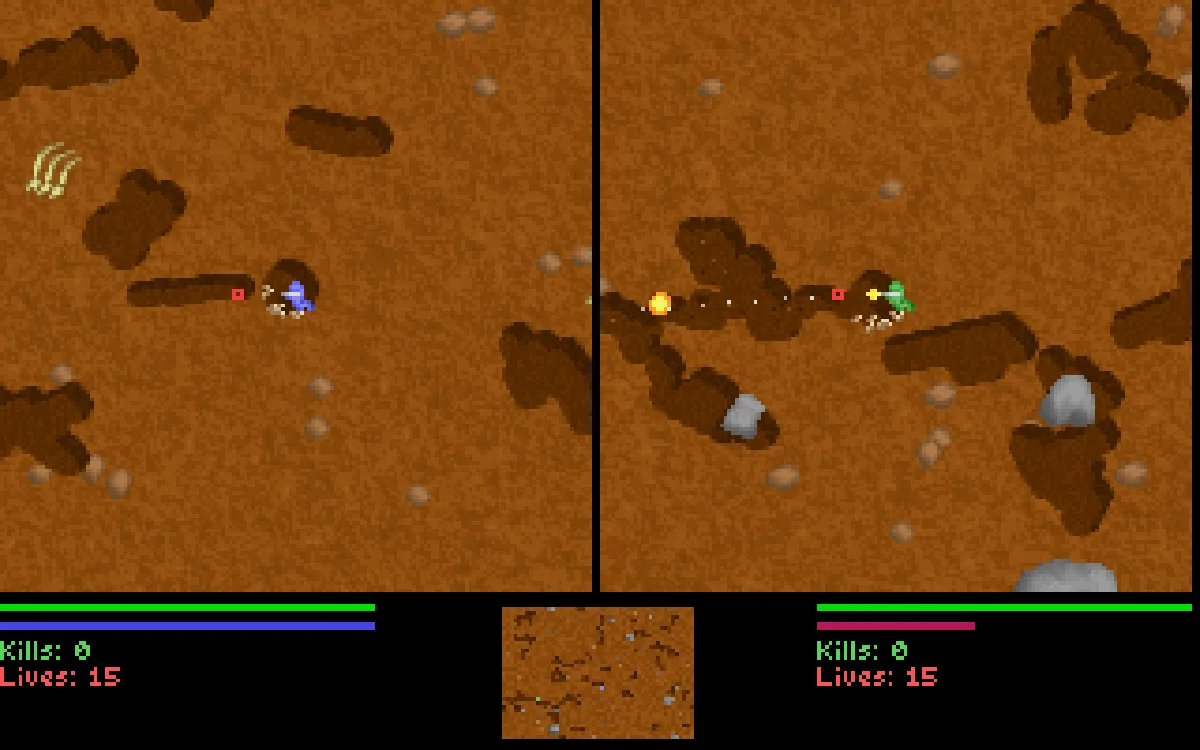
Lierolibre is a free version of Liero, a worm fight for two players that became a small classic on PC in the late 1990s. Each of you controls an earthworm armed to the teeth in a cave made of soft dirt. You shoot, blow holes in the ground, dig your own tunnels and hunt the other worm until one of you runs out of lives. The screen is split in two, one view for each worm, with a small map of the whole cave between them.
What makes it so replayable is the mess. There are 40 weapons, from a humble handgun and a shotgun to bazookas, flamethrowers, cluster bombs, float mines, spikeballs, nukes and a few that are best not explained. Before each round you pick five of them, or let the game hand you a random set, and wooden crates that drop on the map swap your weapon for another one. The ground is fully destructible, so every fight rewrites the level around you. Worms jump, wriggle and swing from a ninja rope, and mastering the rope is what separates beginners from veterans.
Besides the classic Kill'em All, there is Game of Tag, where the one who died last holds a timer that runs against him. If you have no one to play with, the second worm can be a computer player without, as the original author put it, true intelligence. A hidden menu, opened with F1, adds extras such as replays and gamepad support.
Joosa Riekkinen made Liero in 1998. Erik Lindroos rewrote it as OpenLiero, and Martin Erik Werner made Lierolibre out of that, keeping the game identical and giving it a fully free set of sounds.
Playing it here
This is Lierolibre 0.5, the latest release, compiled for the browser from the project's source code. The game was written for an old version of the SDL library and used the Boost libraries; here Boost is replaced by a few lines of our own code, and the rest is adapted to run in the browser without changing how the game plays. The download is about 2 MB, and once loaded the game plays offline. Settings, player names and saved profiles stay in this browser; clearing this site's data deletes them. The game is in English.
Both players share one keyboard, and some browsers or keyboards swallow certain key combinations (Alt and Ctrl keys in particular). If a key does not respond, open Options, choose Player 1 or Player 2 options and set the keys you prefer. The page's own full-screen button is the way to play full screen; the F5 key does nothing here.
Controls
| Action | Player 1 | Player 2 |
|---|---|---|
| Aim up / down | R / F | Up / Down arrow |
| Move left / right | D / G | Left / Right arrow |
| Fire | Left Ctrl | Right Ctrl |
| Change weapon (hold, then move left or right) | Left Shift | Right Alt |
| Jump | Left Alt | Right Shift |
| Throw the ninja rope | change weapon + jump | change weapon + jump |
In the menu, the arrow keys move between the items, Enter picks one, and Escape goes back; during a fight, Escape opens the menu. F6, F7 and F8 change the size of the picture. You can pick your weapons with your fire button: choose Randomize for a random set or Done when you are happy.
Getting started
Pick a weapon set. On the weapon screen, move to an item with aim up and down and press fire to change it. The first time, Randomize is a good way to meet the arsenal.
Learn to dig. Hold move left and tap move right quickly: the worm digs in the direction of its crosshair. Digging makes shortcuts and hiding places.
Use the rope early. Hold change weapon and press jump to throw the rope. While it holds, aim up and down with change weapon pressed to shorten or lengthen it, and press jump to let go. Swinging is much faster than walking.
Tips
The terrain is a weapon. Some explosions open huge holes, and others bury your enemy. Shooting the dirt above a worm in a tunnel can trap him.
Watch your ammunition. Every weapon has a limited magazine and reloads on its own after it runs dry, with a "Reloading..." message under the picture. Switch to another gun while the first one reloads.
Do not stand still. Most weapons are slow and easy to dodge if you keep moving, and a worm that stays in one spot is an easy target for the explosives.
Grab the crates. Wooden crates carry a weapon, and first aid kits give back some health. If you are unlucky, a crate may be a trap and explode.
Questions
Can I play alone? Yes. Open the Options menu and make a player a computer player; it will fight you with a simple artificial intelligence.
Where do my settings go? To this browser, in a small storage area the game uses for its settings file. If you clear the site data, the game goes back to the defaults.
Is it the real Liero? It is a faithful free fork of it: the same game and the same weapons, with free replacements for the original sound effects.