
 Portugues
Loop Tunes
Saved games stay in this browser only.
This game needs a keyboard (or a gamepad). It has no touch controls, so it cannot be played on a phone or tablet without one.
About the game
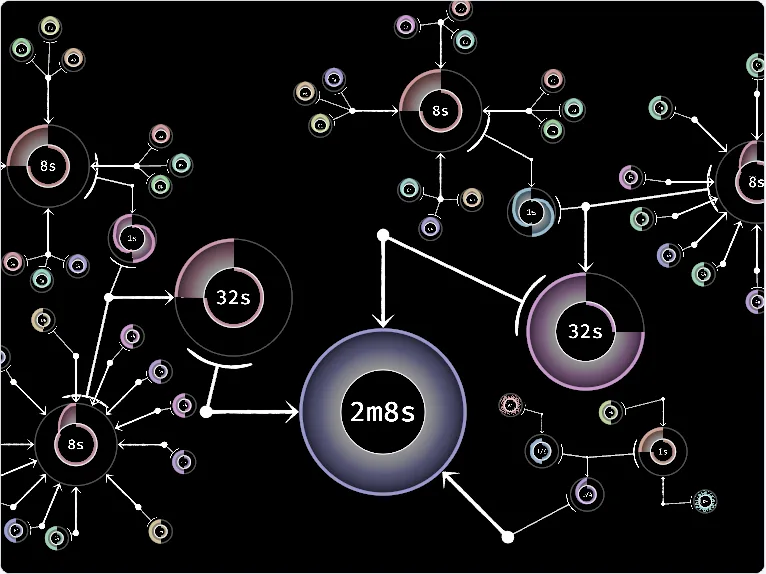
Loop Tunes is a sound toy. There are no menus, no buttons and no instructions on screen; the whole game is a large black canvas with circles on it. Each circle is a waveform that repeats, and the number in its middle tells you how long one repeat lasts: 8 seconds, 32 seconds, a tiny fraction of a second. A circle can be used as the pitch of another one, so a slow circle can bend a fast one, and that one can bend another, until the tree of circles together makes a sound that no single wave could. The biggest circle in the middle, the one marked 2m8s, is the root that everything feeds into.
When the page opens you already see a finished song built this way: a few clusters of small circles around a ring marked 8s, joined by arrows to larger rings and finally to the root. It is the best way to learn what the game does. Start it, then take it apart piece by piece and listen to what each change does.
It was made by bcmpinc during Bevy Jam #5 (2024, theme "cycles") in Rust with the Bevy engine. The sound is generated by the code in real time; there are no recorded samples.
Playing it here
Click Click to play and wait a moment for the game to load (about 5 MB). Sound starts only once you press a key, because browsers require a gesture first. Loop Tunes needs a mouse and a keyboard. Nothing is saved when you close the page; the game can copy a tree of circles as text (Ctrl+C) and paste one back (Ctrl+V), which is how the author suggests sharing songs.
Controls
| Control | Action |
|---|---|
| Hover a circle + Space | play that circle |
| Hover + Shift+Space | play the circle and everything feeding into it |
| Left mouse drag | move a circle; zoomed in, draw on its wave |
| Right mouse drag | pan the view |
| Mouse wheel | zoom |
| Shift + wheel | change the frequency of the circle |
| Keys 0-9 | add a new circle (hold Shift for a 1 Hz one instead of 440 Hz) |
| Ctrl + drag | clone a circle (add Shift to include its children) |
| Shift + drag from one circle to another | connect them |
| Z | change the colour of a circle |
| Delete / Shift+Delete | remove a circle / remove it with its children |
Tips
Start by listening. Hover the big root circle and press Shift+Space. Then hover a small circle somewhere at the edge and press Space to hear only that one.
Zoom in to draw. Zoomed in far enough, you can draw on a circle with the left mouse button and change the shape of its wave. The shape of the wave decides the tone you hear.
Slow circles are rhythm, fast ones are tone. A circle that repeats every few seconds works as a beat or a melody line; one that repeats hundreds of times a second is what you hear as a note.
Credits and licence
Loop Tunes was made by bcmpinc. The game is released, at your option, under the Apache License 2.0, the MIT License or CC0 1.0. The README states that the few assets it has were made by the author during the jam; the text on screen uses Bevy's built-in font (Fira Mono, SIL Open Font License 1.1). The author's README also thanks ChatGPT, among other resources, for help with writing some of the code. We changed nothing in the game; the page that hosts it is ours. The licence texts, those of the Rust libraries compiled into the game and the source are linked from this page.
FAQ
I hear nothing. Click the game, then hover a circle and press Space. Check that your browser tab is not muted.
Can I keep my song? The game has no save. Hover the root of your song and press Ctrl+C to copy it as text; paste it into a file, and use Ctrl+V on the game later to bring it back.
Does it work on a phone? No: it needs a mouse with two buttons and a keyboard.