
 Portugues
Mirage Golf
Saved games stay in this browser only.
About the game
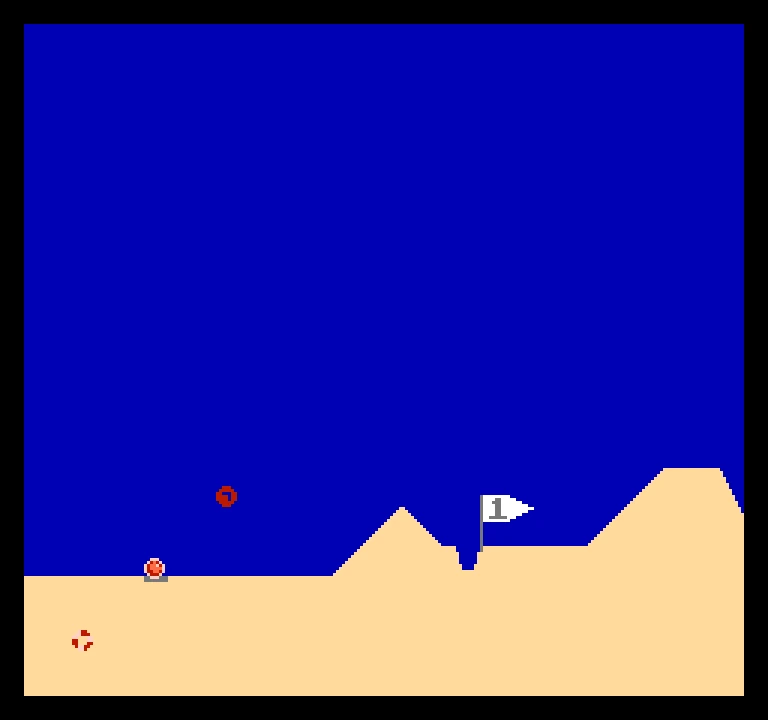
Mirage Golf is a golf game stripped down to its core. There is no clubhouse, no wind chart and no scorecard: you see a stretch of sand, a ball, a flag and a cup, and you try to get the ball in with as few strokes as possible. When it drops, a new hole is generated and the course carries on, one hole after another, for as long as you want to keep playing.
The terrain is made of dunes, slopes and dips, and no two holes are the same. The pleasure is in reading the ground: a small change in angle or strength decides whether the ball stops short, rolls into the cup or sails on past the flag. The stroke count for the current hole sits at the top of the screen.
The game was released by Brad Smith as NESert Golfing, a name that appears on the title screen of the ROM. We list it here as Mirage Golf, with the original title kept inside the game itself, because it is a different game from the commercial one that inspired it, and we do not want anyone to confuse them. The help screen in the game credits that original, Desert Golfing by Justin Smith, as the starting point.
Playing it here
Mirage Golf is a homebrew game made for the NES: a new game by an independent developer, not a commercial release. It runs here in jsnes, an NES emulator written in JavaScript. Click Play. On the title menu, move down to the "How many?" row and press X to pick the number of players, from one to four; they take turns on the same keyboard. Then choose Play.
To hit the ball, hold X, then press the arrow keys. A marker moves out from the ball as if you were pulling back a slingshot, and the ball flies the opposite way: pull it to the right and up to send the ball left and low. The further you pull, the harder the stroke. Let go of X to swing. Holding Z while you aim makes the movement finer. The original also supports a mouse, which this emulator does not offer.
Controls
| Key | NES button | Action |
|---|---|---|
| Arrow keys | Control Pad | aim, choose in menus |
| X | A | hold to begin a swing, release to hit; choose in menus |
| Z | B | hold for fine aim |
| Shift | Select | only used for the Tournament Edition code in the help screen |
| F2 / F4 | — | save / load the state |
A few things worth knowing
Start gently. On a flat stretch a short stroke tells you how the ball rolls. Hit hard only when you have seen how far it goes.
Use the slopes. A ball that lands on a downhill keeps rolling, and an uphill can stop it. Think about where it will end up, not only where it lands.
Take it slow near the flag. The cup is a narrow notch in the ground under the flag, and a gentle stroke has the best chance of stopping in it.
Read the help screen. It is in the title menu and explains the controls in the author's own words. It also mentions a Tournament Edition that lets you pick the seed of the course.
FAQ
Does the course ever end? No. New holes keep arriving, so the game is about beating your own stroke counts.
Can I play with friends? Yes, up to four players can take turns on one keyboard. Choose the number on the title menu before starting.
Why is it called Mirage Golf here but NESert Golfing inside? Brad Smith released it as NESert Golfing. We use a different name on the site, since it takes its idea from a paid game, but we have not changed the ROM.
Credits and licence
Mirage Golf is NESert Golfing by Brad Smith (2019, version 1.5), released by the author under the Creative Commons Attribution 4.0 licence. The readme asks for attribution to Brad Smith in documentation and accessible credits, which is what this section does. The ROM is the one the author publishes on itch.io, unchanged. The game takes its idea from Desert Golfing by Justin Smith; this site and this page have no connection with that game or its makers. The licence file has the readme and the link to the full licence.