
 Portugues
Nebula M09
Saved games stay in this browser only.
About the game
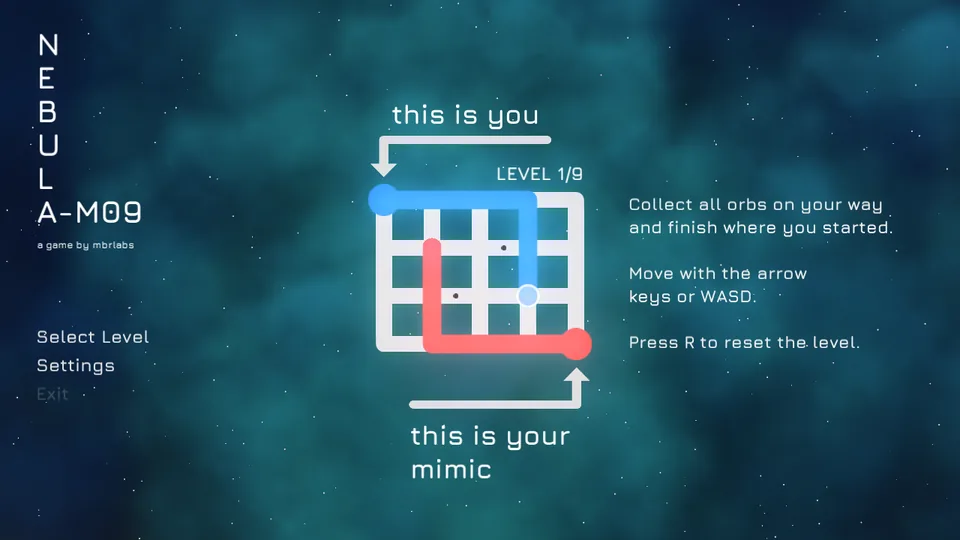
Nebula M09 is a puzzle about symmetry, drawn over a slowly moving cloud of stars. Each level is a small white grid. On it you control a blue dot that leaves a blue trail behind it, and at the opposite corner a red dot, your mimic, does exactly what you do, but mirrored. When you go right, it goes left. When you go up, it goes down.
The goal is written on the first screen: collect all the little orbs along your way and finish where you started. Either line can pick up an orb, but the lines cannot run into walls or into a trail, and the two dots cannot meet, so every move you make also places the red line on the other side of the board. A level that looks empty can take a minute of thought.
There are nine levels, all handmade, and they introduce one idea at a time. Moving is a single key press per step, there is no timer and nothing chases you, you can step back along your own trail to undo a move, and a bigger mistake only costs you a press of R. The music is a slow, warm track, and the sounds are short, soft notes.
Playing it here
Click Play and wait a moment while the game loads (about 14 MB, downloaded only when you press the button). Click once inside the game so that it gets the keyboard. The first level shows an arrow for "this is you" and one for "this is your mimic", and the controls appear on the right of the grid. The game needs a keyboard.
Controls
| Input | Action |
|---|---|
| Arrow keys or W, A, S, D | move one step (the mimic moves mirrored) |
| R | reset the level |
| Mouse | menu: Select Level and Settings |
Tips
Plan the mirror first. Before you move, imagine where the red dot will be. Often the second line is what blocks a path that looks free. If you walk back over your own trail, the line is undone, so you can retreat without a reset.
Think about the ending. You have to come back to the start, so leave a way home before you collect the last orb.
Use R freely. Resetting is instant and free, so try an idea to see what the mimic does with it.
FAQ
Does it work on a phone? The game was made for a keyboard, so it is meant for a computer.
Is my progress saved? No, the game does not save your progress. The Select Level screen in the menu lets you jump to a level.
Why is Exit greyed out? The menu entry is disabled in a web page. Close the tab when you are done.
Credits and licence
Nebula M09 was made by Marcus Brummer for the 47th Godot Wild Jam (theme: symmetry) and runs on Godot Engine 3.5.3, also under the MIT licence. The code and the art are under the MIT licence.
- Music: "Temple by the sea" by Eino Toivanen (kongano.com), licensed under Creative Commons Attribution 4.0.
- Font: Jura (The Jura Project Authors; Daniel Johnson, Cyreal), SIL Open Font License 1.1.
- Particle textures: Kenney (kenney.nl), CC0.
Two decorative logos in a corner of the menu (Godot and Godot Wild Jam) and the gong sound of the end screen were left out of this version because their licence is not stated in the repository.
The licence texts, including the notices of the libraries inside the Godot engine, and the source of this build are linked from this page.