
 Portugues
Petty Kingdoms
Saved games stay in this browser only.
About the game
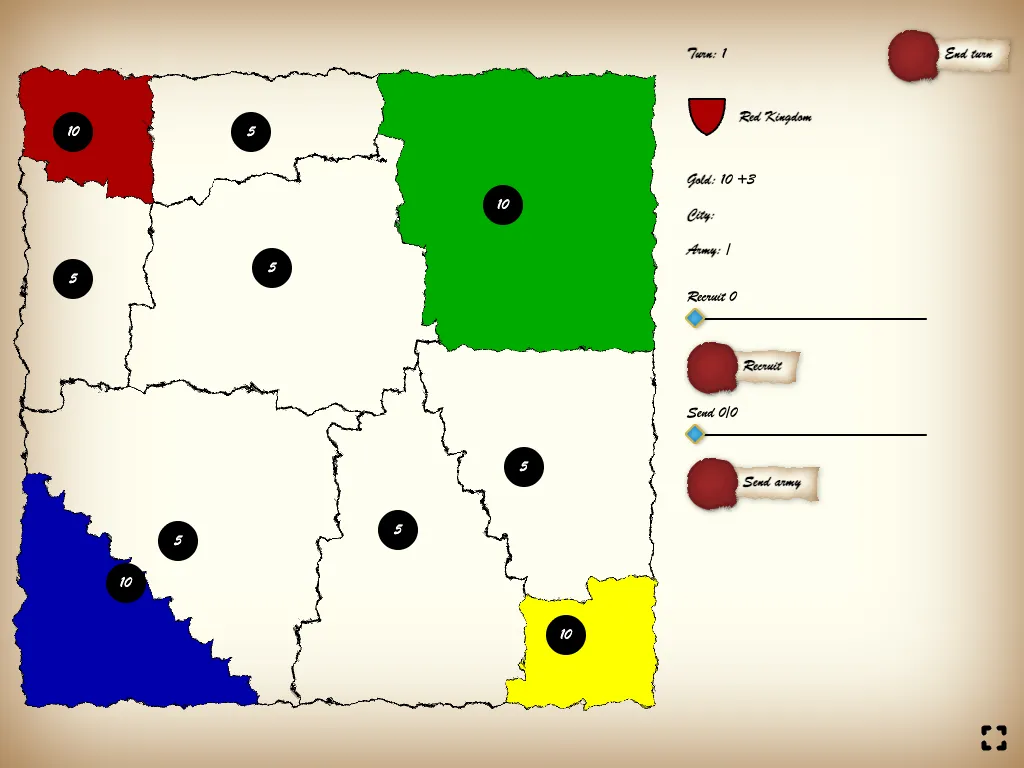
Petty Kingdoms is a map-conquest game boiled down to a few buttons. A rough, hand-inked map is split into regions, each with a number on it that says how many soldiers it holds. Four kingdoms, red, green, blue and yellow, start in the corners with ten soldiers each, and the neutral regions around them hold five. The goal is simple: take the neighbours, then take their neighbours, until one crown is left.
On your turn you earn gold, three for each region you own, and you decide where it goes: one gold buys one soldier. You can recruit new soldiers in a region you own, or send some of the soldiers you already have into a region next to it, either to defend it, to claim an empty land or to attack a rival. The result of a battle is not fixed: the attacker or the defender can receive a boost of up to half again of their strength, so a small margin is never a sure thing. Troops that have just moved, attacked or been recruited have to rest until the next turn, although they still defend where they stand.
You can play against up to three computer-controlled kingdoms, or turn any of the four into a human player and pass the screen around for local multiplayer on one device. There are three map sizes, with 10, 16 or 36 regions, and every game starts on a freshly generated map.
Marcin Walczak made Petty Kingdoms for js13kGames 2023, where the whole game had to fit in 13 KB. The map, the paper look and the buttons are drawn by the code, and the game has no sound.
Playing it here
Click Play. On the first screen choose, for each colour, whether it is a Player or a CPU, pick the map size and press Start game. You start as the red kingdom if the first slot is a Player. Click a region you own to select it: the sliders let you choose how many soldiers to recruit with your gold or how many to send. For a move, set the Send slider, press Send army and then click a neighbouring region (Cancel backs out). Press End turn when you are done and the other kingdoms play theirs. The last kingdom with any land wins. Nothing is saved between visits. The button in the corner switches to full screen.
Controls
| Input | Action |
|---|---|
| click a region you own | select it |
| Recruit slider and button | spend gold on new soldiers in the selected region |
| Send slider, Send army, then a region | move soldiers to a neighbouring region (empty, yours or an enemy's) |
| End turn | finish your turn |
| corner button | full screen, where the browser allows it |
| touch | tap instead of click |
A few things worth knowing
Spend your gold. Soldiers recruited this turn cannot march until the next one, so put them in the regions where you will need them.
Do not strip your own border. Troops that attack, or that you move out, are gone from the defence. A region that borders a rival should keep enough soldiers to hold.
Small maps are quick. The 10-region map is a good way to learn the rhythm of a turn, and the 36-region map is for when you want a long campaign.
Credits and licence
Petty Kingdoms was created by Marcin Walczak. The game is released under the MIT licence; the licence text is linked from this page.