
 Portugues
Pirate Fleet
Saved games stay in this browser only.
About the game
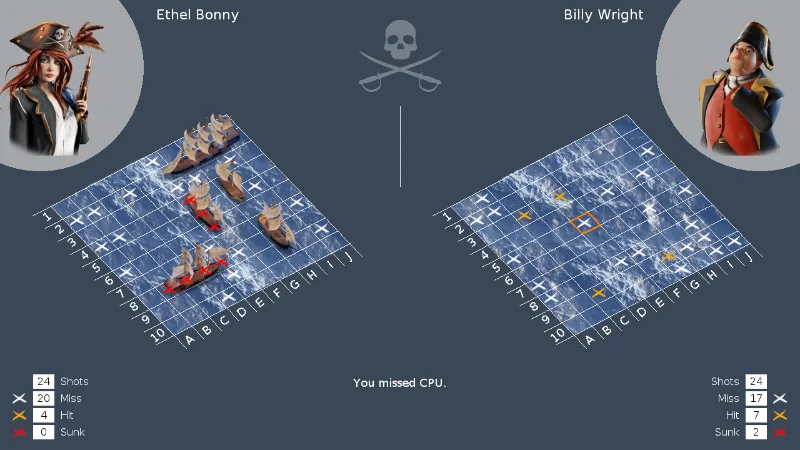
Two pirate captains, two stretches of open sea, and ten columns by ten rows of water that neither of you can see in full. You hide a small fleet on your own grid: a fast two-masted sloop, two three-masted ships, a four-masted brigantine and the five-cell flagship, The Princess. Your rival does the same on a grid you can only read through your own shots.
Then the turns begin. You call a square and fire; the sea answers with a splash (a miss), a burning cross (a hit) or a red cross when the last cell of a ship goes down. After each of your shots the other captain takes one at you, and the first side to sink all five ships wins the loot.
It is a quiet, thoughtful game with a lot of charm: the grids are drawn in perspective over rolling waves, the ships are painted 3D models, and each captain has a portrait and a short story. You pick one of three pirates before you set sail, and the other two come to the table as the computer's captain.
Playing it here
The first time you click Play the page downloads the Python runtime and the pygame library (about 23 MB), which takes a few seconds; after that a "click to start" message appears, and one more click opens the game. Nothing is loaded from other sites. Your choices in the options screen (difficulty, music, sound effects) are kept in this browser; a battle in progress is not saved.
- Choose your pirate with the arrows and confirm.
- Place your five ships. Move the ship over the grid, rotate it if you like, and confirm the position. Not in the mood to plan? Let the game place them for you.
- Fire on the right-hand grid, one shot per turn, and watch the notes at the bottom for the result.
Controls
| Input | Action |
|---|---|
| Left click | place a ship, or fire at the square under the pointer |
| Right click | rotate the ship you are placing |
| Middle click | place the ship, or fire, at a square chosen for you |
| Arrow keys | move the ship you are placing, or the firing cursor |
| R | rotate the ship |
| Enter | confirm the position, or fire |
| Space | choose for you |
| Esc | back to the menu (you can continue the battle from there) |
Tips
Hunt in a checkerboard. The smallest ship covers two squares, so firing at every other square still finds everything while using half the shots.
Finish what you start. After a hit, fire at the squares beside it until the ship sinks. The red cross tells you it is gone, and you can stop looking there.
Do not hug the edges. Many players tuck their ships along the border. Keep a few in the middle, and do not leave two ships side by side in the same pattern every time.
Raise the difficulty when it gets easy. The options screen has five levels, from Easy to Insane, and a Cheat level if you only want to watch the scenery.
Frequently asked questions
Does it save my game? Only your options. A battle in progress is lost when you close the page, but the menu lets you pause and continue within the same visit.
Does it work on a phone? It is made for a mouse or a keyboard, so it is meant for a computer.
Can I play against another person? No. You play against the computer.
Is it free? Yes. The code is free software and the art, sounds and music are under free licences.
Credits and licence
CAP (this page calls it Pirate Fleet) was made by Fabien Givors, who wrote the program and the English and French texts, and Damien Monteillard, who made the illustrations, ships and sound effects (CC0). The code is under the MIT licence. The music, "Titan" by Scott Buckley (https://www.scottbuckley.com.au/), is under CC BY 4.0, and the font is DejaVu Sans. The in-game credits also thank the authors of a few free Blender models and sound clips. The version served here changes only what a browser needs (the main loop, the language taken from the page, settings kept in the browser, no Quit item and no full-screen option) and the name; the change and the build script are linked from the Licenses page. The game runs on pygame-ce (LGPL-2.1) and CPython, whose licences and source are linked there too.