
 Portugues
Guess (Simon Tatham's Puzzles)
Saved games stay in this browser only.
About the puzzle
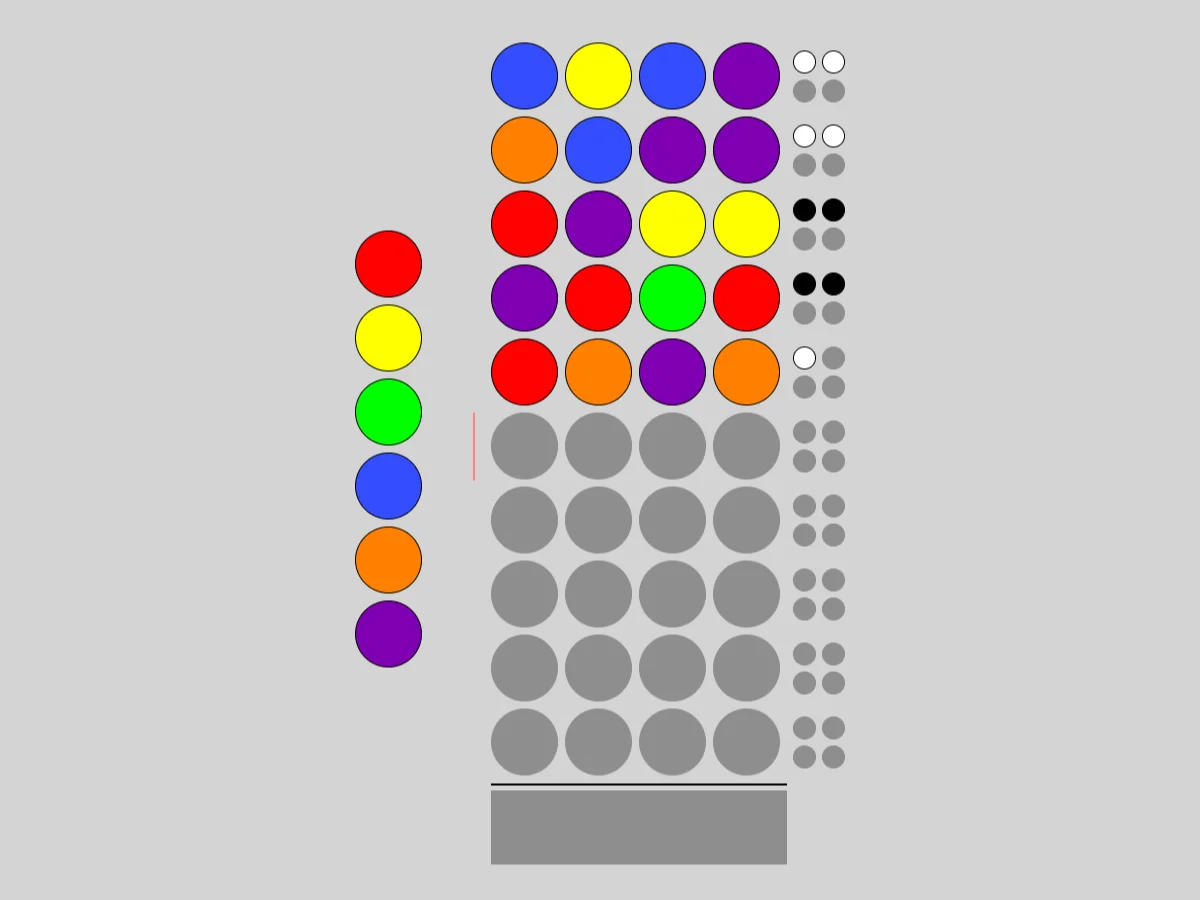
Guess is a code-breaking game. The computer hides a row of coloured pegs, and you have a limited number of tries to reproduce it exactly. After each try, small marking pegs tell you how close you came: one black mark for every peg of the right colour in the right place, and one white mark for every peg of a right colour that is in the wrong place. The marks do not say which pegs they refer to; working that out is the puzzle.
Code-breaking games of this kind are old, played with pencil and paper long before there were boards and pegs, often under the name bulls and cows. James Harvey wrote this version for the collection. Its standard setting has six colours, four pegs per row and ten guesses, and you can change all three.
Rules
- The hidden row has a fixed number of pegs, each in one of the available colours. By default the same colour may appear more than once.
- Each guess is a full row of pegs. Once it is complete, mark it to see the result.
- A black mark means one peg is the right colour in the right position. A white mark means one more peg has a colour from the hidden row, but in another position. A peg is never counted twice.
- You win when a guess gets all black marks. If you run out of guesses, the answer is shown.
Controls
| Input | Action |
|---|---|
| Drag a peg from the tray | put that colour in the current row |
| Drag a peg from any row | copy it to another position |
| Drag a peg off the board | remove it |
| Right click a peg in the current row | hold it: it is copied into the next row |
| Click the marking pegs | submit the completed row |
| Up / Down, Left / Right, Enter | choose a colour, choose a position, place it |
| 1 to 9 | insert the first, second... colour and move right |
| D or Backspace / Space | remove a peg / hold a peg |
| H or ? | fill the row with a suggested guess |
| L | show the colour numbers on the pegs |
| N / U / R | new game / undo / redo |
How to solve it
Spend the first guesses on information. A row of two colours, such as two pegs of one and two of another, tells you about both colours at once. Many players start with two such rows to learn which colours are in play.
Black plus white counts colours. Add the black and white marks together and you know how many of your pegs have a colour from the answer, regardless of position. Comparing totals between guesses tells you which colours appear and how often.
Change one thing at a time. When you are close, move a single peg or swap two and see how the marks change. If a black mark turns white, the peg you moved was in the right place before.
Every guess must fit all the marks. Before submitting, check your row against each previous result: would it have earned exactly those marks if it were the answer? A guess that could not be the answer wastes a turn, unless you are deliberately using it to test something.
Hold pegs you are sure of. Holding a peg copies it to the next row automatically, which saves dragging the same colour again and again.
Sizes and difficulty
The Type menu has Standard (six colours, four pegs, ten guesses) and Super (eight colours, five pegs, twelve guesses). Custom chooses up to ten colours, the number of pegs and guesses, whether blank pegs are allowed in guesses and whether the answer may repeat a colour.
Playing here
Click Play to open the puzzle. The menu above the board has New game, Restart, Undo, Redo and Solve (which you can undo to keep going on your own), the Type menu with the sizes, and the Game menu, where you can type in a game ID or a random seed, download the current game as a file, load a saved file and change the preferences. Your game in progress is kept in this browser and comes back with its whole undo history the next time you open the page.
On a touch screen, drag pegs with your finger and tap the marking pegs to submit; turn on the Mark button above the board to hold a peg.
Credits and licence
Guess was written by James Harvey for Simon Tatham's Portable Puzzle Collection, which Simon Tatham maintains with code contributed by several other authors and distributes with its source code under the MIT licence. This page runs a WebAssembly build made by FredyGames from the author's official source snapshot, with no changes to the puzzle; the source and the build script are hosted with the game, and the licence text is linked from this page.