
 Portugues
You're the OS!
Saved games stay in this browser only.
About the game
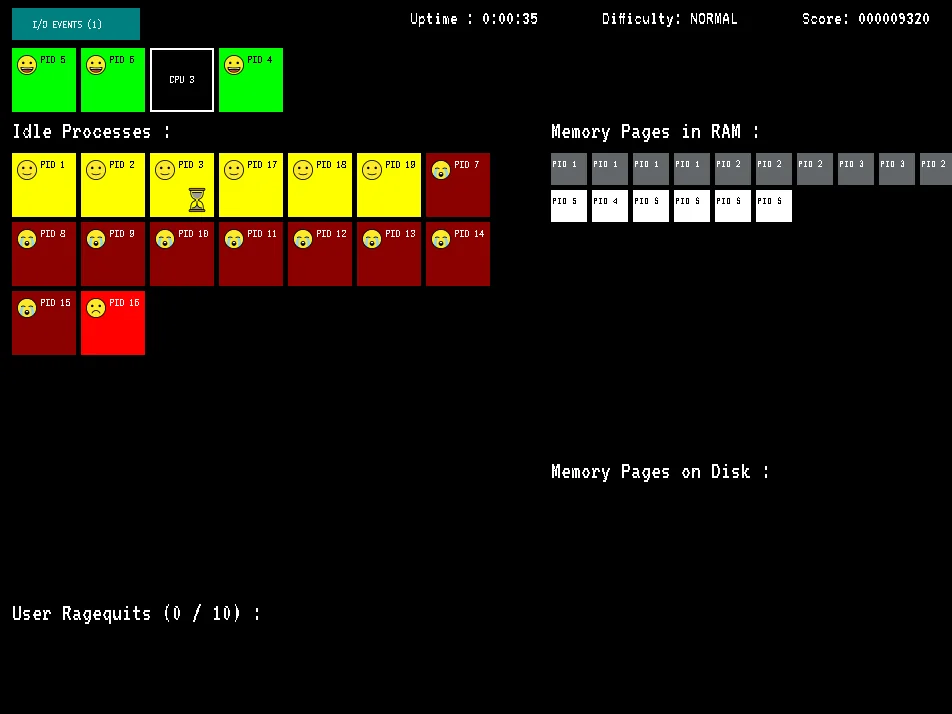
You're the OS! puts you in charge of a computer, not as its user but as the operating system. At the top of the screen sit the CPUs; under them, a growing list of idle processes, each with a face that tells you how it feels. Every process wants CPU time, and there are always more processes than CPUs, so you spend the game moving them on and off the processors, giving each a turn before it gets too hungry.
A process that waits too long changes colour and mood, from content yellow to furious red, and if nobody serves it the user loses patience and kills it. Ten killed processes and the user reboots the machine: game over. The score keeps climbing while your processes are well served and drops for every process the user has to kill, so the goal is to stay up as long and as smoothly as you can.
It does not stop at scheduling. Running processes sometimes block while they wait for input or output, and only you can deliver the pending I/O events. They also fill memory with pages, and when RAM runs out the new pages land on disk, where the processes cannot use them until you swap them back. Priority processes, marked with a crown, starve faster than the others. Keeping all of this balanced as the load rises is the whole game.
Pier-Luc Brault wrote the game in Python with pygame-ce and released it in 2023 as free software, and he still updates it. Without a single line of theory, it turns textbook operating system ideas (scheduling, starvation, blocking I/O and paging) into something you can feel under your fingers.
Playing it here
Click Play and wait while Python and the game load in the page (the download is about 25 MB, so the first start takes a few seconds). If the loader shows "Ready to start!", click the game once more; then choose a difficulty and press PLAY. The main menu also has a short illustrated tutorial (HOW TO PLAY) and the list of hotkeys.
Five difficulty levels are available, from Easy to Insane, plus a Custom mode where you choose the number of CPUs, the number of processes, the size of the RAM, how slow swapping is and how often new, priority and blocking processes appear. The game does not keep scores between sessions: each match starts fresh.
This version runs exactly as the author wrote it. The only difference is in how it is delivered: the Python runtime that the game normally loads from a third-party server is served from this site together with the game.
Controls
| Input | Action |
|---|---|
| Click an idle process | put it on a free CPU |
| Click a running process | take it off its CPU |
| Click the I/O events bar, or Space | deliver the pending I/O events |
| Click a memory page | move it between RAM and disk |
| Shift + click a page | move a whole row of pages |
| 1 to 9, 0 | take the process off CPU 1 to 9, or 10 |
| Shift + 1 to 6 | take the process off CPU 11 to 16 |
| S | sort the processes (once the Sort button appears) |
| MENU button | restart the game or go back to the main menu (Esc closes the menu) |
The game is designed for a mouse and keyboard.
A few things worth knowing
Rotate, do not park. A process on a CPU recovers, but every other process keeps starving meanwhile. Take processes off once they look happy again and give the CPU to the most desperate one.
Watch for blocked processes. A process waiting for I/O wastes its CPU. Take it off, deliver the I/O events, and put it back later.
Keep busy pages in RAM. White pages are in use, grey ones are idle. When RAM fills up, move idle pages to disk so the active ones fit, and bring back the pages of a blinking process at once.
Crowns first. Priority processes go through the starvation levels faster, so serve them before the others.
Credits and licence
You're the OS! was created by Pier-Luc Brault and is free software under the GNU General Public License, version 3 or later. The game icon is a modified version of an image by Muhammat Sukirman (CC BY 3.0), the emojis come from OpenMoji (CC BY-SA 4.0), the Game Over photo is by Aleksandar Cvetanović (published on Pixabay in 2018 under CC0) and the fonts VT323 (Peter Hull) and Victor Mono (Rune Bjørnerås) are under the SIL Open Font License. It runs on the pygbag runtime (MIT), with CPython (PSF License) and pygame-ce (GNU LGPL 2.1). The licence texts and the complete source code of this build, including pygame-ce, are linked from this page.