
 Portugues
13 Steps to Escape
Saved games stay in this browser only.
About the game
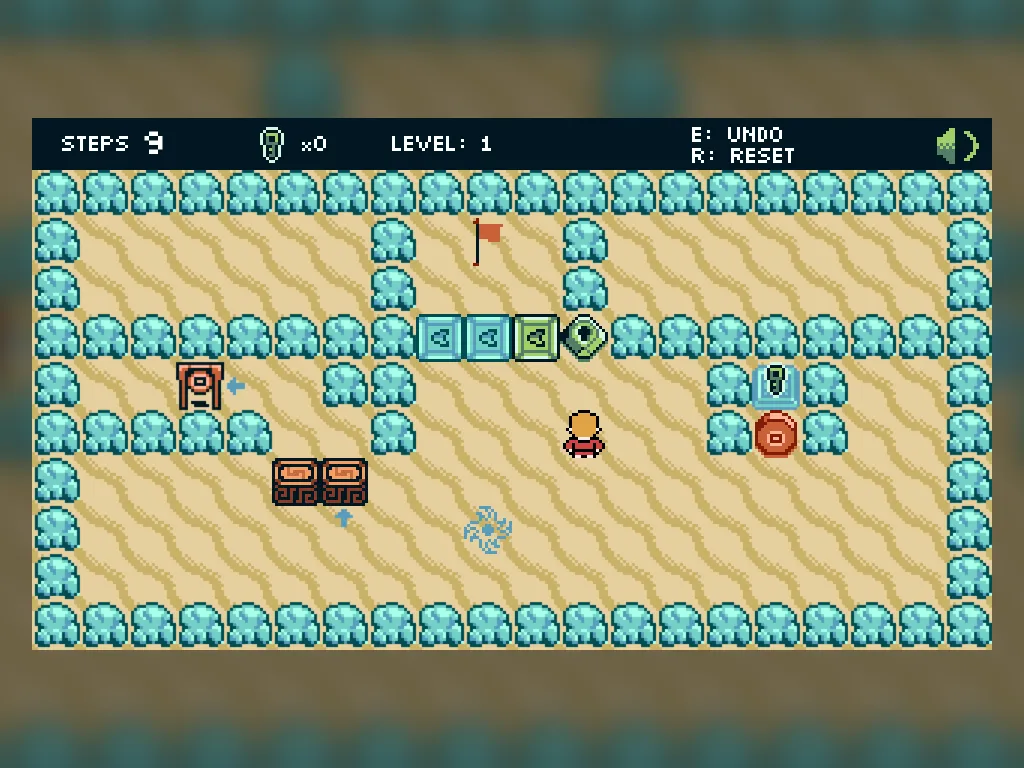
In every level there is a flag, and you have to reach it. What stands in the way is a short list: crates to push, keys that open locks, switches that move walls, a boulder that rolls, holes to fill, spikes and gongs. The catch is in the title. You get only thirteen steps or actions, and when they run out you are put back at the start of the level.
That small budget turns an ordinary puzzle into a puzzle about efficiency. A solution that works is not enough: it has to work in thirteen moves, so you spend a lot of time looking at the board before touching anything. The step counter at the top counts down as you move, and the undo key gives steps back when you change your mind. There are eight levels in the main game, and they introduce one mechanism at a time before combining them.
The game also ships with its own level editor. You place tiles with the mouse, rotate those that can face a direction, give each switch or gong a colour, and test the level on the spot. The Test/Share button opens the level in a new tab, with the whole level written into the address, so it can be played again later by opening the same address.
Jonathan Vallet, who goes by the nickname Satanimax, made 13 Steps to Escape for js13kGames 2024, where the whole game had to fit in 13 kilobytes and the theme was "Triskaidekaphobia" (the fear of the number 13). By his own account it was inspired by Isles of Sea and Sky, and the pixel art, music and sound effects are all part of those 13 kilobytes.
Playing it here
Click Play and click once on the game so the keyboard works. Choose New Game (or Level Selection to jump to a level), pick the look of your little character, and the first level starts. Your progress and the sound setting are kept in your browser. The speaker icon in the corner turns the sound on and off. In the Level Editor you build with the mouse; the level you made lives in the address that Test/Share opens, so copy that address if you want to keep it.
Controls
| Input | Action |
|---|---|
| W A S D, Z Q S D or arrow keys | move |
| Enter | confirm in the menus |
| E | undo the last step |
| R | restart the level |
| Esc | back to the main menu |
| Gamepad stick / A / left bumper or Y / right bumper | move / confirm / undo / restart |
| Mouse (level editor) | pick a tile and place it; mouse wheel changes its direction |
A few things worth knowing
Plan before the first step. Thirteen is tighter than it looks, and one wasted move can be the difference. Follow the route with your eyes first.
Undo gives the step back. Take back a mistake as soon as you see it, before it costs you more moves.
Watch the crates. A crate pushed into a corner may be stuck there for good, so think about where each push leaves it.
Credits and licence
13 Steps to Escape was created and developed by Jonathan Vallet (Satanimax) and released under the MIT licence. The licence text, with the notice for the SoundBox music player by Marcus Geelnard (zlib), is linked from this page, and the source code is on GitHub.