
 Portugues
Atc
Saved games stay in this browser only.
About the game
Atc is an air traffic control game that Ed James wrote at the University of California, Berkeley, in 1986 and 1987 and that was shipped with BSD Unix. In the manual he says it was based on a game for some PC he had seen years earlier. It became famous among students for good reason: a text screen, a clock that keeps ticking and a few letters moving across the radar are all it takes to make your hands sweat.
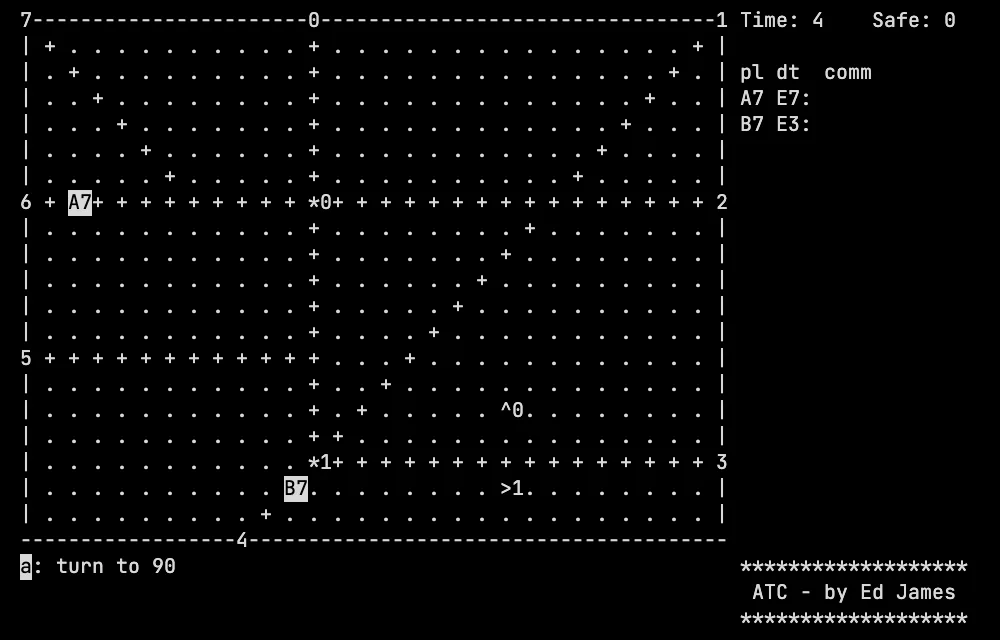
The radar is a field of dots. Planes are single letters followed by their
altitude in thousands of feet: a capital letter is a propeller plane, a small
one is a jet, and jets move faster. Numbers on the border are the entry and exit
points, and numbers inside the field with an arrow (^, >, v, <) are
airports, showing the direction in which planes land and take off. Beacons are
reference points you can send planes to. On the right, a list shows each
plane, its destination, its fuel and the command it is carrying out.
Your job is to send each plane to where it wants to go: land it by flying it over the right airport at the right heading and bringing its altitude down to zero, or take it out through the right exit at 9,000 feet. Meanwhile new planes keep arriving, and two planes that get too close in all three dimensions collide. You keep going until you make a mistake: a collision, a plane that runs out of fuel, or a plane that leaves the wrong way. The score is how many planes you got home safely.
Playing it here
This is the atc game of the bsd-games 2.17 collection, compiled for the browser from its source code, with the original rules and its default arena. The clock ticks by itself, so you issue commands while the planes move. The screen is the game's own text screen, and there is no sound. When the game ends, it shows the list of the best scores, which stays in this browser. The game is in English and needs a keyboard.
Controls
Every command starts with the letter of the plane (case does not matter), and Enter sends it. Typing ? at any point lists what you can type next, and Backspace takes back the last part of the command.
| Command | Action |
|---|---|
| plane, t, direction | turn to a compass heading: w north, e north-east, d east, c south-east, x south, z south-west, a west, q north-west |
| plane, t, l or r | turn left or right (45 degrees by default; add a direction key for the amount) |
| plane, a, digit | set the altitude, in thousands of feet |
| plane, a, + or - | climb or descend |
| plane, c | circle |
| plane, m or u or i | mark (highlight), unmark or ignore a plane |
| ... then @, b and a beacon number | do it when the plane reaches that beacon |
| Enter alone | advance the clock now |
| ? | list what you can type |
| Ctrl+L | redraw the screen |
| Ctrl+C | quit (after you confirm with y) |
Tips
Think about the heading as you go. To land, a plane must arrive over the airport in the direction the arrow shows, at low altitude, and then you tell it to go to altitude zero.
Use altitude to keep planes apart. Collision needs all three dimensions close, so sending one plane a few thousand feet higher is the simplest way to avoid one.
Circle around a beacon to hold a plane while you deal with others.
Mark the planes you worry about with the m command so that they stand out.
FAQ
The game moves by itself. Can I pause it? No. Atc works in real time; what you can do is hold planes in circles.
Can I pick another arena? The classic collection also has other maps, but this version starts the default one.
What counts as a win? There is none: you play for as many safe planes as you can.