
 Portugues
Boxie Coody
Saved games stay in this browser only.
About the game
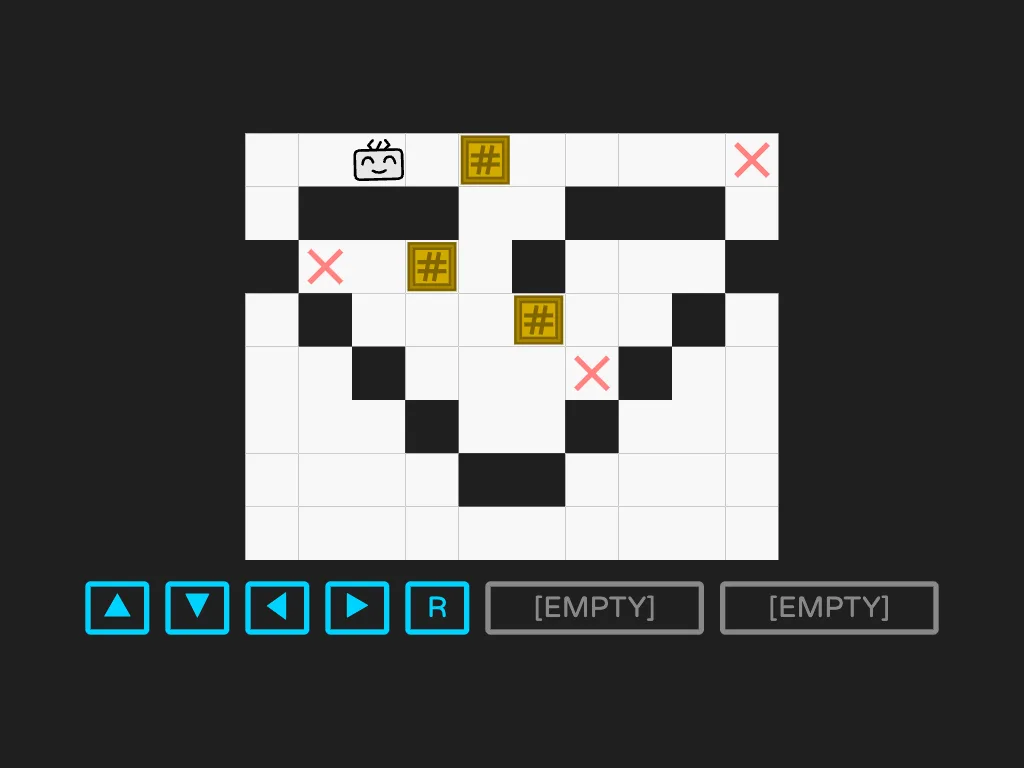
Boxie Coody is a box-pushing puzzle with a small story around it. You have just started working at BoxieHub, a warehouse full of crates (the "boxies"), and your partner is Coody, a cheerful little robot. The warehouse is a grid seen from above. Some squares hold a boxie and some squares carry a pink cross; a day is done when every cross has a boxie on it. You give the orders and Coody does the walking.
Pushing boxies in a straight line is how it starts, but a boxie pushed into a corner stays there, so even the first day asks you to think ahead. After that the days get more interesting, because Coody learns programs. On day two comes one that lets it jump over a boxie. On day four, one that pulls a boxie instead of pushing it. On day five, one that moves two boxies that are stuck together. Coody can only keep two programs in memory at a time, so before each level you choose which two to take along, and that choice is half of the puzzle. There is also a fourth program that the engineers wrote and that you should not use. Or should you?
The dialogue between levels is short and funny, the drawings are simple vector art with a lot of personality, and the sound effects are small and soft. A full run is five days, a "work week", and a few minutes per day.
Playing it here
Click Play, then click inside the game so it receives the keyboard, and press Space or Enter to read through Coody's lines. The rest of the controls are on the screen: four arrow buttons, R to undo and two wide buttons for the special programs. To use one, press its button (or the key 1 or 2) and then a direction; the program works for that one move. On the "Transfer" screen, click a program, or press its number, to send it to Coody. There is no saved progress: if you close the page you start from day one again.
Controls
| Input | Action |
|---|---|
| arrow keys or WASD | move Coody one square (and push or pull a boxie) |
| Space or Enter | continue the dialogue |
| 1 and 2 | arm the program in the first or second wide button; it is used on the next move |
| R | undo the last step |
| L | restart the whole level |
| mouse or touch | the same, with the on-screen buttons |
A few things worth knowing
Undo is free. R takes back a step as many times as you like, so try ideas and walk them back instead of restarting.
Think about which two programs to take. The wrong pair can make a level much harder, and the right one can make it simple.
Read what Coody says. The lines between levels often say what the day's programs are for, and hovering over a program in the Transfer screen shows a short hint about it.
Credits and licence
Boxie Coody was made by the LastFlower team (LastLeaf and tongtonggggg) for GitHub Game Off 2016: game design by both, code by LastLeaf, art and sound effects by both. The code is under the MIT licence; the art, dialogue and sound effects are under Creative Commons Attribution-ShareAlike 4.0, so anything made from them has to credit the authors and keep the same licence. The sound effects were made with LMMS and the GeneralUser GS soundfont. The Varela Round font is under the SIL Open Font License. The licence texts are linked from this page. On this site the link to GitHub on the title screen is plain text.