
 Portugues
Gaia Maker
Saved games stay in this browser only.
About the game
In Gaia Maker you arrive at a lifeless world with a fleet of orbital machines and an overseer's job: make the planet liveable. The planet is simulated as a map of tiles, and underneath the map are the numbers that matter in terraforming: the temperature of the air, the rainfall, the fertility of the soil, the amount of water, oxygen, nitrogen and carbon dioxide in the atmosphere, the energy that arrives from the star, and the amount of living matter on the ground.
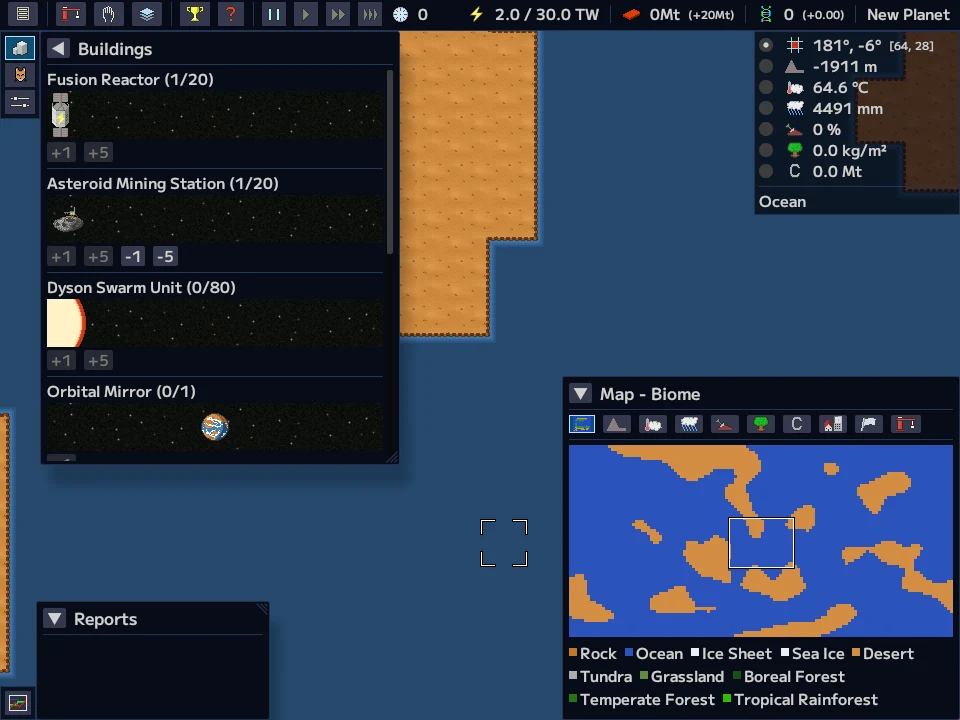
You do not move a character. You build and you wait. The first thing a planet needs is power and materials, so you put up fusion reactors, asteroid-mining stations and Dyson swarm units in orbit. With power you can start work on the ground: soil fertilisation plants to turn rock into ground that can bear plants, rainmakers, heaters or orbital mirrors to bring the temperature into the range where plants grow, oxygen generators and carbon capturers to change the air. You may also do the opposite, with black dust, aerosols, volcanic eruptions or concentrated sunlight, because the game is as happy to let you wreck a planet as to let you green it.
When grass, then forests, spread across the tiles, gene points accumulate and you can spend them to release animals from a catalogue, each of which lives in the kinds of ground that suit it. In the best cases, intelligent life arises and a civilization begins to grow on the planet. It builds cities, develops technology and uses energy, it can fall into decadence or war, it can be struck by plague, and in time it can leave its home for the stars. Your actions change what happens to it, and the game keeps a list of achievements for the many ways a planet can end up. There are several starting planets (continental, archipelago, ice, desert and barren), a custom planet whose numbers you set, and a step-by-step tutorial that takes you from the first reactor to the first forest.
It was made by T. Okubo (garkimasera) in Rust with the Bevy engine and the egui interface library, and is available in English and Japanese.
Playing it here
The game runs in the page and is played with the mouse and the keyboard. Click Click to play; the first start loads about 11 MB of game code and assets, and then the title screen appears. For a first game use Tutorial, which teaches the controls and the first steps, or New to pick a planet. The browser version has limits that the game itself mentions on the title screen: only one automatic and one manual save are kept, in your browser's local storage, and the simulation runs more slowly than in the downloadable version. Choosing Exit in the game reloads the page.
This build comes from the open-source repository, so a few things the author's commercial release has are missing: the logo and the title picture on the title screen, and the background music.
Controls
| Input | Action |
|---|---|
| W A S D or arrow keys | move the view |
| Mouse wheel | zoom in and out |
| Middle click | centre the view on the tile under the cursor |
| Left click | use the selected tool on a tile, or press interface buttons |
| Right click | drop the selected tool |
| Space | pause and resume the simulation |
| F1 / F2 | open the buildings and the animals windows |
| F5 / F6 | open the map and the statistics windows |
| Esc | close the open windows |
Tips
Do the tutorial once. The order of the steps matters: power first, then soil and rain, then oxygen, and only then animals.
Use the cursor read-out. The indicator at the top right gives the temperature, rainfall and biomass of the tile under the cursor, which is how you find the places where plants can start.
Speed it up when the work is done. Terraforming is slow: when you have built what you can, press the fast-forward buttons in the toolbar and watch the map in the corner.
Pause to think. Space stops the clock without closing anything.
Credits and licence
Gaia Maker was made by T. Okubo (garkimasera). The program is released under the GNU General Public License, version 3. The pictures, sounds and texts in the game (the files under assets in the repository) are released by the author under Creative Commons Attribution 4.0 (CC BY 4.0): "Gaia Maker" assets by garkimasera, https://creativecommons.org/licenses/by/4.0/, unchanged. The picture of the dolphin was contributed to the repository by another user. The font is Mplus2 by the M+ FONTS Project, under the SIL Open Font License 1.1. As the GPL asks, the source code of this build is hosted next to the game, with the build script (the code is unchanged), the sources of the libraries under the MPL and the licences of all the Rust libraries compiled into the game.
FAQ
It says that the web version is limited. What is limited? The browser version keeps one automatic and one manual save, and the simulation is slower because the browser runs the game on one thread.
Where did my save go? It is stored in your browser's local storage for this site. Clearing the site data erases it.
Nothing seems to happen. The planet changes slowly. Check that the simulation is not paused (the buttons at the top) and press the fast-forward button.
Why is the title screen empty? The logo and the title picture are not part of the open-source repository, so this build leaves them out.