
 Portugues
Game Boy Chess
Saved games stay in this browser only.
About the game
Game Boy Chess is exactly what the name says: the full game of chess, written for the 8-bit Game Boy and squeezed, engine and all, into a 32 KB cartridge. Every rule is there, including castling, en passant, promotion, check, checkmate and stalemate, and the computer opponent actually searches ahead rather than moving at random.
You choose who plays which side. Take White or Black against the computer, pass the Game Boy to a friend for a game between two people, or set both sides to the computer and watch. There are four levels, from Beginner to Hard; the author measured them against Stockfish at roughly 900 to 1325 Elo, which makes the top level a fair challenge for a club beginner.
Small touches make it pleasant to play: pieces slide to their squares, the last move stays highlighted, a bar beside the board shows who the engine thinks is ahead, and a little spinner turns while it thinks. The first moves come straight from an opening book stored in the cartridge, so the computer answers well-known openings instantly.
Nick Craig-Wood wrote it in 2026 as one of the cartridges for a Game Boy emulator he entered in the International Obfuscated C Code Contest.
Playing it here
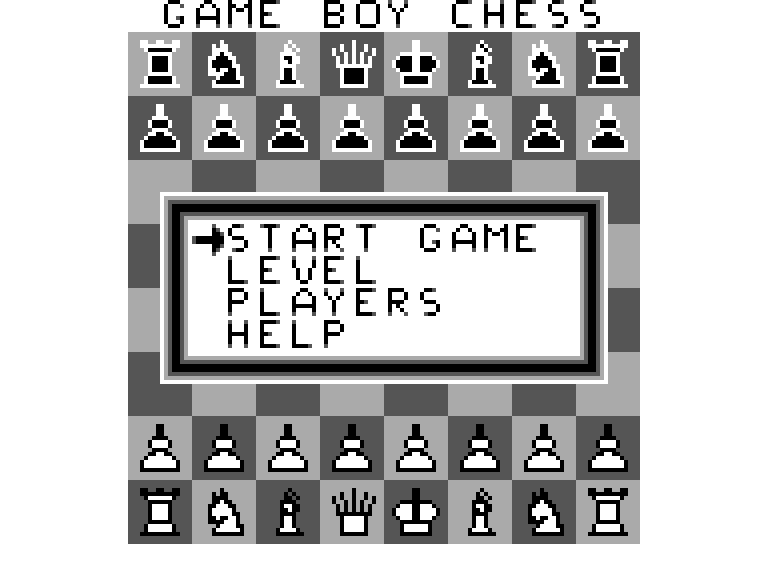
This is a homebrew game made for the Game Boy: a new game by an independent developer, not a commercial release. It runs here in binjgb, a Game Boy emulator compiled to WebAssembly. Click Play now; the main menu opens over the board, and Start Game begins a match with you as White against the computer on the Easy level.
The cartridge has no save memory. F2 saves the current state of the emulator in this browser and F4 brings it back, which is handy for pausing a long game. A gamepad works too.
Controls
| Key | Game Boy button | Action |
|---|---|---|
| Arrow keys | Control Pad | move the cursor; choose in menus |
| X | A | pick up a piece, put it down; confirm in menus |
| Z | B | cancel the selection |
| Z (hold) | B | while the computer thinks: stop it and open a menu |
| Shift or Ctrl | Select | open the game menu |
| F2 / F4 | — | save / load the emulator state |
A few things worth knowing
Set the match before you start. The main menu has Level (Beginner, Easy, Medium, Hard) and Players (Human v Comp, Comp v Human, Human v Human, Comp v Comp). Start Game uses whatever you picked.
The game menu does the rest. Select during a game offers Undo, Flip Board, Swap Sides, New Game, the level and player settings, and a help page. Swap Sides is a quick way to let the computer take over your position.
Hurry the computer along. Holding Z while it thinks opens a menu where Play Now makes it move with the best move found so far. You can also flip the board or start over from there.
Promotion is to a queen. A pawn that reaches the last rank always becomes a queen.
Picking up the wrong piece is fine. Press X on another of your own pieces to switch to it, or Z to put it back.
Credits and licence
Game Boy Chess is by Nick Craig-Wood: the engine, the opening book, the graphics, the sound effects and the interface. It is free software under the MIT licence and was built with GBDK-2020. The licence text is linked from this page.