
 Portugues
Hexa Battle
Saved games stay in this browser only.
About the game
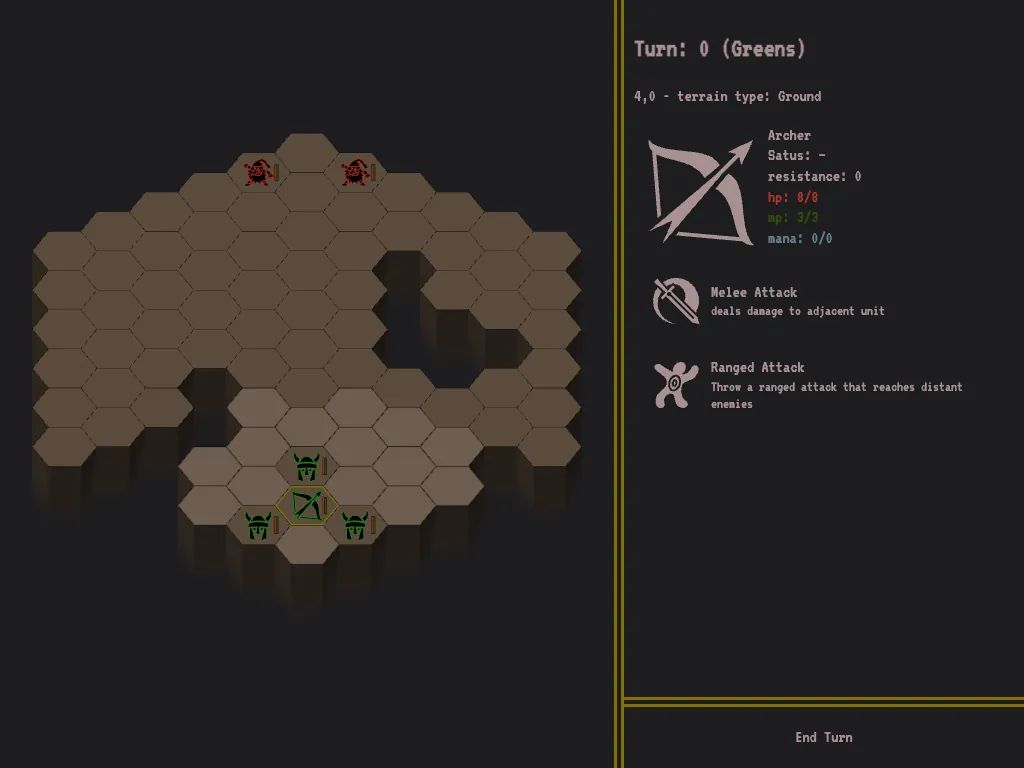
Hexa Battle is a small tactics game played on a board of hexagons. You lead a party of heroes into a dungeon, and each level is one fight against a group of monsters that the computer controls. The map is a cave full of ledges and pits, so where your units stand matters as much as what they do. When the last enemy falls you move on to a deeper level with the heroes who survived, and the fights get harder every time.
Between levels you earn gold, and the shop turns it into new recruits. The roster is wide: archers, barbarians, knights, warriors, horsemen, clerics who heal, mages who throw fireballs and teleport, even a catapult. The monsters have their own tricks, from bats and spiders that slow you down with webs to orcs, trolls, giants, demons and dragons that breathe fire. Each unit has its own health, movement, resistance to damage and a short list of actions, and the information panel tells you what they do.
Giacomo Tagliabue wrote Hexa Battle in 2017 with TypeScript, React and SVG, and everything you see, the map and the little icons, is drawn in the page. There is no sound. The author says it was only tested in Chrome; here it was checked in a current Chrome.
Playing it here
Click Play, then click "Start your adventure". The board shows your units in green and the enemy in red. Click one of your units to select it: the right-hand panel shows its health, movement points and mana, and lists its actions. Click an action (or press its number), then click the hex where you want it to happen. Moving is the default action: the lighter hexes show where the selected unit can walk, and clicking one takes it there. When every unit has moved and acted, or when you have nothing more to do, press End Turn and the computer plays its side. A level ends when one party is gone. Your progress and the units you bought are saved in this browser, and the Reset Progress button on the first screen starts over.
Controls
| Input | Action |
|---|---|
| click on a unit | select it and show its actions |
| click on an action, then on a hex | use that action on that hex (move, attack, cast) |
| Spacebar | select the next unit that can still act |
| 1 to 9 | choose the matching action of the selected unit |
| End Turn button | hand the turn to the computer |
Tips
Use the terrain. Pits and ledges block the way. Put a knight where the enemy can only reach you one at a time, and keep fragile units behind.
Ranged and magic first. Archers, mages and the catapult can hurt enemies that cannot reach them yet, so open the fight with them.
Keep your units alive. The ones that survive come with you to the next level, so retreating a wounded unit is often better than winning the exchange. A cleric is worth the gold.
Spend the gold. The reward grows with the strength of the enemy you beat, and a bigger party is the best defence against the next, bigger fight.
FAQ
Is there a way to play against another person? No, you always play against the computer.
Does it have sound? No.
Where is my progress? In this browser, on this device. Clearing the site data removes it.
Does it work on a phone? It was written for a mouse; taps work, but the board is small and the shortcuts need a keyboard.
Credits and licence
Hexa Battle was written by Giacomo Tagliabue and is released under the MIT licence. All the pictures are icons from game-icons.net, licensed under Creative Commons Attribution 3.0. The icons are by Lorc (crumbling ball, dragon head, feathered wing, fire breath, fire ray, high shot, horned helm, imp, sleepy, spider web, spinning sword, squib, target dummy, teleport, visored helm), Delapouite (cherish, cross shield, horse head, jump across, orc head, two-handed sword, viking head, wizard face, woman elf face, wood club), Skoll (bat, troll), Cathelineau (bad gnome), Heavenly Dog (catapult) and Carl Olsen (spider). The text is set in VT323 (SIL Open Font License) and the page uses normalize.css (MIT), both served from this site. The game was built from the author's source; the changes made for this site are relative paths in place of absolute ones, the local copies of the font and of normalize.css in place of the CDN links, and a rule that blocks any request to other sites. The patch, the build script and the licence texts are linked from this page.