
 Portugues
Linefire
Saved games stay in this browser only.
About the game
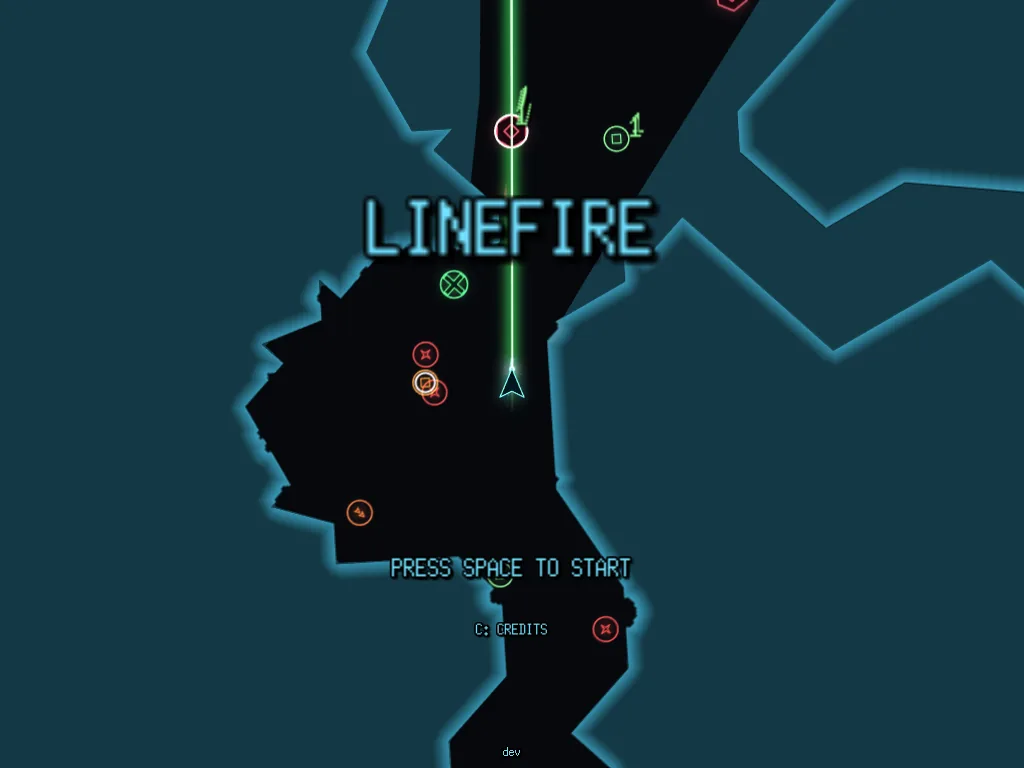
Linefire is a twin-stick shooter drawn entirely with glowing vector lines, with a CRT glow over everything. Your ship stays in the middle of the screen pointing up, and the whole world turns and slides around it. Each stage is a cave of rock where you have to clear the enemies, and the rock is not just scenery: your shots and the explosions dig through it, so you can open your own way. Dig far enough past the edge of a map and you warp into a fresh, harder procedural screen, with a portal to go back.
The campaign has 16 hand-made stages and ends in a boss lair. Beating the boss opens a one-way portal to the Rift, an endless chain of generated screens that you play for score and that, as the game itself says, has no way home. Along the way there are power-ups for fire rate, damage, shields, bubbles, reflection, seeking shots and allied drones, and several weapons in numbered slots (a front gun, laser, missiles, mines and a devourer). The HUD shows your enemies left, score, the best score, time and objectives, with a round radar in the corner.
The game is in pre-alpha: its author says plainly that it is "not ready for use", so you may meet rough edges. It is made by one person, Cesar Gimenes, in Go. The three music tracks were generated with an AI (Google Gemini), which the author says in the repository, and the sound effects are synthesised by the game itself.
Playing it here
Click Play, wait for the download (the game is about 15 MB and loads once) and click inside the game so it gets the keyboard and the mouse. On the title screen press Space to start (C shows the credits). Esc opens the pause menu, where you can set the volume, mute, resume, restart or quit; quitting stops the game on this page, and reloading the page starts it again. Nothing is saved in the browser.
Controls
| Input | Action |
|---|---|
| W A S D or arrow keys | turn and thrust (S reverses, Down brakes) |
| Q and E | strafe |
| Shift | afterburner boost |
| Space or mouse | fire |
| Tab | change the aim mode |
| G | auto-fire on or off |
| M | full-screen map |
| F6 | mute |
| F11 | full screen |
| Esc | pause menu |
Tips
Dig your own way. Shots and explosions carve the rock, so a wall in the way is a place to shoot.
Watch the counter. Each stage shows how many enemies are left, and clearing them all is the objective.
Use the map. The M key shows the whole stage, and a round radar in the corner shows what is near you.
Try auto-fire. The G key lets the ship's computer fire for you while you steer, which helps in crowded rooms.
Frequently asked questions
Is the music made by a person? No. The three tracks were generated with Google Gemini, and the author says that no copyright is claimed over them.
Does it work on a phone? The game has a two-thumb touch control, but the author notes that long sessions can run out of memory on mobile Safari; a computer is the safer way to play.
It stopped after I pressed Quit. That is how Quit works in a browser: reload the page to play again.
Credits and licence
Linefire was made by Cesar Gimenes (crgimenes) and is released under the MIT licence; its text, with that of the libraries compiled into the game, is on this page. The soundtrack was generated with Google Gemini, as the author states in the repository. The game is shown here exactly as published, without changes; the source of this build and the build script are linked from this page.