
 Portugues
Lost Robot
Saved games stay in this browser only.
About the game
Somebody was supposed to write the mapping module. He did not, and now a small two-wheeled robot is lost somewhere in a building with no idea how to get back to its charging point. The good news is that the remote control still works, and so do its sensors.
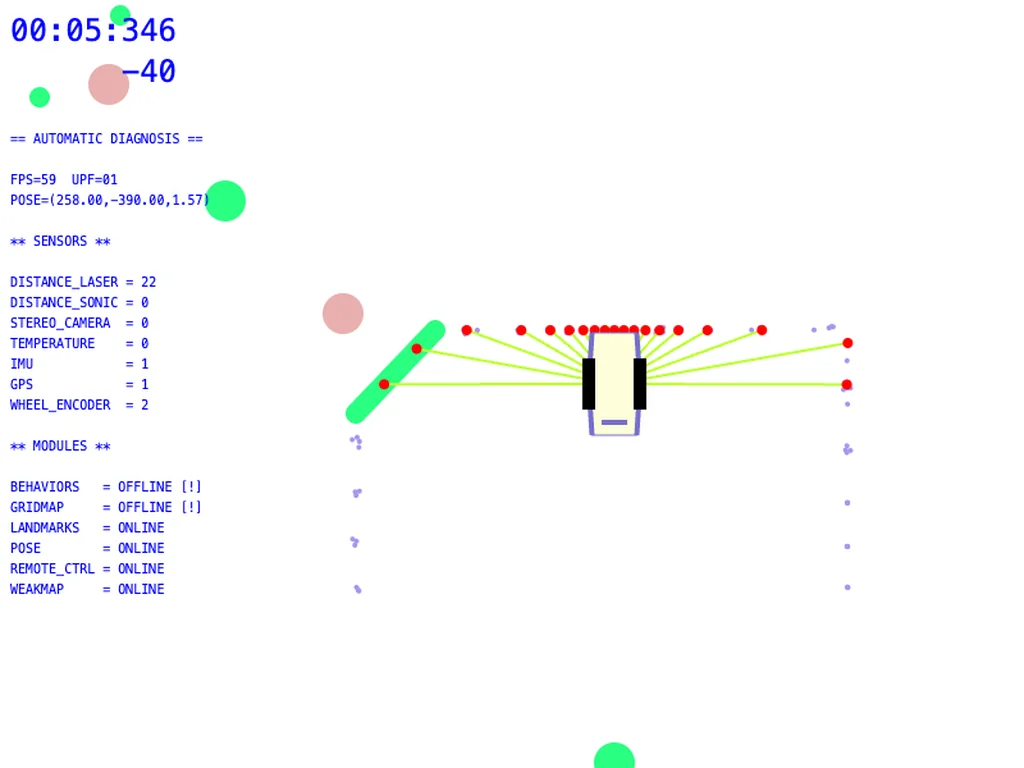
That is all you get to see. Lost Robot shows no map: the screen is the robot's own debug view, a top-down sketch of the machine surrounded by the rays of its distance laser, the dots where they hit a wall, and a running diagnosis of which modules are online (the grid map, naturally, is not). Walls only exist where the sensors have touched them, so finding your way means sweeping the beams around, building a picture of the corridors in your head and driving carefully through them.
Each of the four maps hides landmarks to collect. They add to your score, and some of them are coloured switches that open doors of the same colour, so the route home is rarely straight. A clock runs from the start, and the map menu keeps your best points and time for every level during the session, which turns each map into a small speed run.
Dennis Meckel made Lost Robot for js13kGames 2019, whose theme was "Offline". This is the build sent to the competition.
Playing it here
Click Play, then Start, and choose a map. The controls come in two flavours, listed on the map screen: easy mode drives the robot like a toy car with the arrow keys, while hard mode gives each wheel its own pair of keys, as a real two-wheeled robot would be driven. The game needs a keyboard; there are no touch controls. Nothing is saved between visits.
Controls
| Easy mode | Hard mode | Action |
|---|---|---|
| ↑ / ↓ | W/S and I/K together | forward / back |
| ← / → | W and K, or S and I | turn |
| T | Space | turbo |
| C | C | switch between a fixed and a rotating camera |
A few things worth knowing
Slow down near walls. The sensors only show what the beams hit, and turbo makes it easy to drive into something you have not seen yet.
Try the rotating camera. With C, the view can turn with the robot, so "forward" is always up on the screen; some players find the corridors easier to follow that way.
Learn the map, then race. On a second run you already know where the doors and landmarks are, and the clock starts to matter.
Credits and licence
Lost Robot was created by Dennis Meckel. It is built with the Kontra game library by Steven Lambert, the SAT.js collision library by Jim Riecken and the ZzFX sound generator by Frank Force, all under the MIT licence. The game is released under the MIT licence; the licence texts are linked from this page.