
 Portugues
Mongol March
Saved games stay in this browser only.
About the game
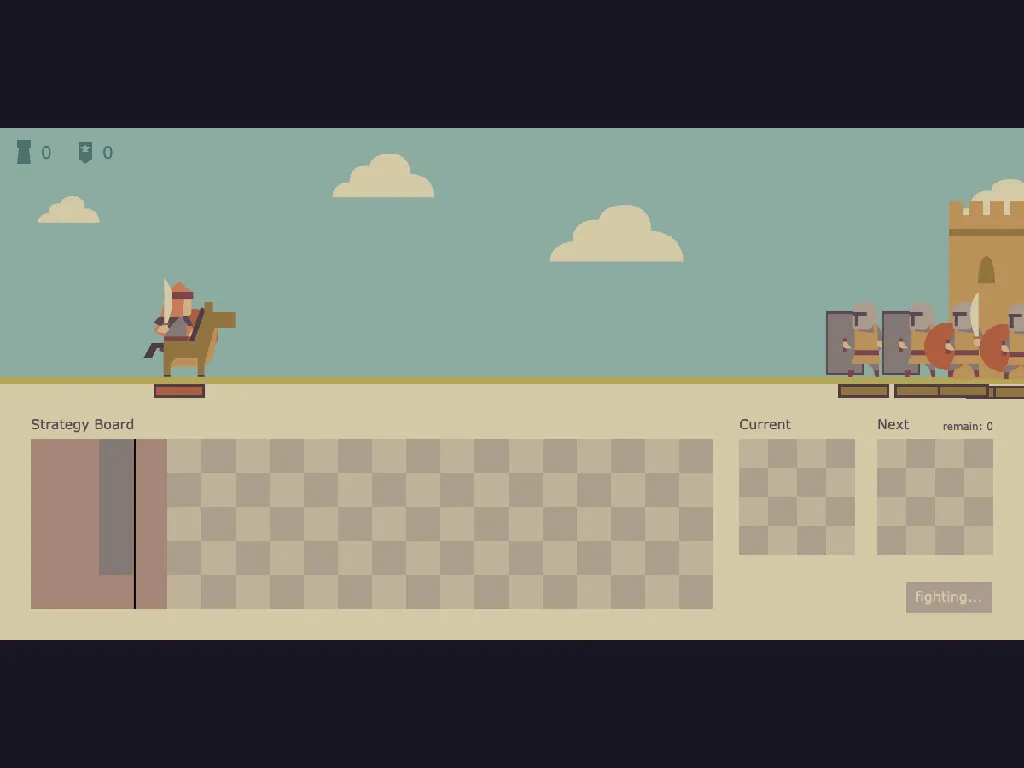
Mongol March is a strategy puzzle in two halves. The first half is a planning board: a wide grid on the lower part of the screen, with the next blocks waiting on the right. Each block is a shape made of four squares, and each one stands for a type of soldier: infantry, archers, cavalry, shield bearers or gunners. You place them on the board wherever they fit, turning them to fit the space.
The second half is the battle. When the blocks run out, or you decide you have placed enough, you press the button and the board becomes a marching order. The soldiers appear in the order of the blocks from left to right, run across the field and meet the defenders of a castle on the right. Every kind of soldier has its own attack, range, speed and health, so the layout you built a few seconds earlier decides who reaches the walls first. Squares you leave empty are locked for the next round, so a tidy, full board is worth more than a messy one.
Win the fight and the next wave brings a new castle. Between waves you can take one of two gifts, or skip them. Each gift trades a bonus (more attack, range, speed or health, or repairs to locked squares) against a smaller drawback, so it is a choice, not a free prize. Your score counts the strength of the enemies you defeated and the soldiers who are left standing. If your army falls, you retry from the start.
Leo Kuo made Mongol March for js13kGames 2023, whose theme was the 13th century, and the whole game had to fit in 13 KB. The soldiers, the castle and the clouds are small vector drawings made by the author.
Playing it here
Click Play and wait through the short opening text. When Wave 1 appears, move the mouse over the strategy board: the block that you are holding follows the pointer by its anchor square. Press Z to rotate it, click to put it down and the next block takes its place. Use waive when a shape does not suit you. When the blocks are over, press the button and watch the battle. The game has no sound and nothing is saved between visits. It needs a mouse or a trackpad and a keyboard for rotating, so it is not suited to phones.
Controls
| Input | Action |
|---|---|
| mouse over the board | preview the current block |
| left click | place the block, press buttons |
| Z or click on the anchor point | rotate the block by 90 degrees |
| waive button | give up the current block |
| attack button | start the battle once the blocks are gone |
A few things worth knowing
Think about the order. Soldiers march out from left to right, so put the tough ones, such as shield bearers, at the left of the board and the archers behind them.
Fill the board. An empty square is locked next round, so it is worth planning the shapes to leave few gaps.
Use waive sparingly. Giving up a block frees you from an awkward shape, but it also leaves empty squares and a smaller army.
Credits and licence
Mongol March was created by Leo Kuo. The game is released under the MIT licence. It also uses the Kontra game library by Steven Lambert (MIT licence). Both licence texts are linked from this page.