
 Portugues
openScope
Saved games stay in this browser only.
About the game
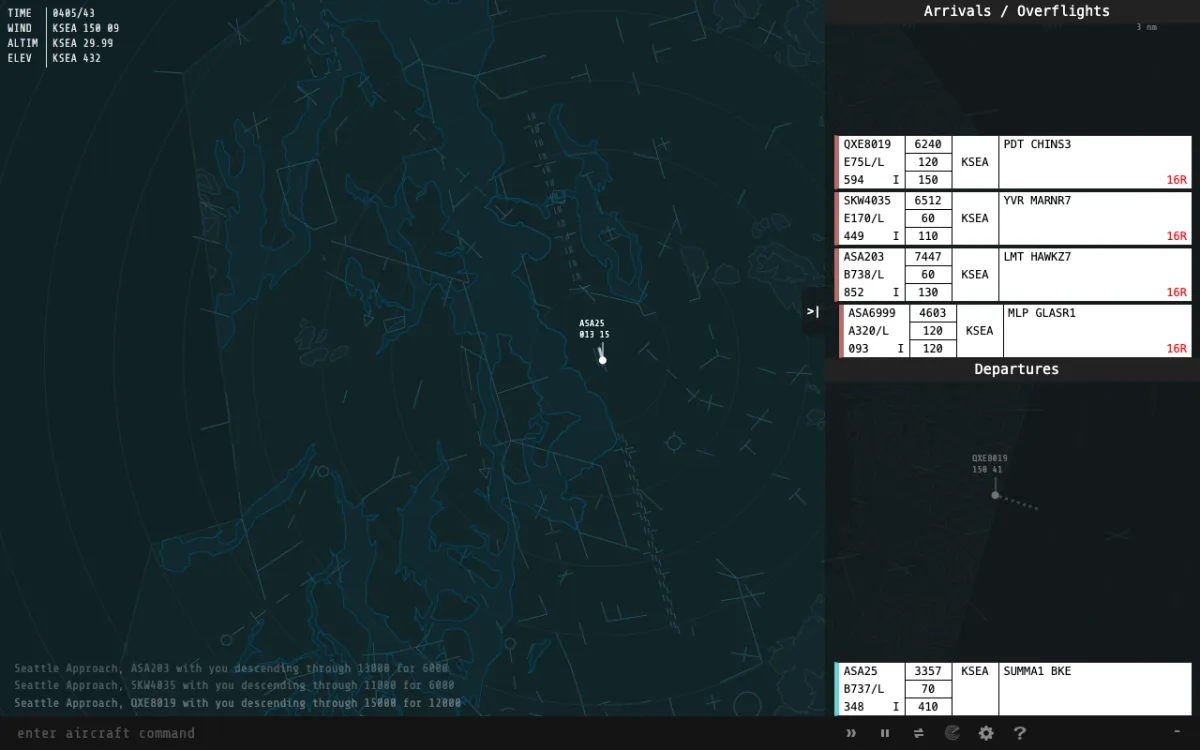
openScope puts you in front of a radar screen. Aircraft appear as blips with data blocks showing callsign, altitude, speed and heading, and you run the airspace around a real airport: clear departures for takeoff, bring arrivals down to the runway, and keep everything separated by the distances air traffic control demands. You do it the way controllers do, by talking to the pilots, which here means typing short commands.
There are more than sixty airports to choose from, from small regional fields to big international hubs, each with its own runways, departure and arrival routes, restricted areas, winds and traffic mix, and a difficulty label from beginner to hard. The flight strips on the right show who is about to arrive, who is waiting to depart and what each aircraft is cleared to do. The airlines and aircraft types are modelled with their own speeds and climb rates, and the callsigns follow the real airline codes.
Your score rises for every aircraft you land or send out of the airspace properly and falls for each one that leaves without landing, strays into a restricted area, lands in a bad crosswind or, worst of all, collides with another.
Playing it here
Click Play and the simulator opens with the first airport. If you are new, open the Tutorial from the help menu in the bottom bar: it teaches the first commands step by step. The Airport Guide lists each airport's routes and runways, and the airport menu switches field. Settings (the gear) change the control method, the colour theme, the data block style and the speech option. The last airport you used, your zoom level and your settings are kept in this browser.
Controls
| Input | Action |
|---|---|
| Click an aircraft or its strip | select it, so its callsign is filled in for you |
| Type and Enter | send a command to the selected aircraft |
| Page Up, Page Down, Up and Down arrows | select the previous or next aircraft |
| Tab | complete a command |
| Esc | deselect the aircraft and close dialogs |
| Mouse wheel | zoom the radar |
| Drag with the mouse | pan the map |
A few commands to start with, each written after the callsign (or after the aircraft is selected):
| Command | What it does |
|---|---|
| fh 270 | fly heading 270 |
| t r 90 | turn right to heading 090 |
| c 50 | climb to 5,000 ft (altitudes are in hundreds of feet) |
| d 30 | descend to 3,000 ft |
| - 210 | slow to 210 knots (use + to speed up) |
| e 28R | expect runway 28R |
| i 28R | cleared for the ILS approach to runway 28R |
| cto | cleared for takeoff |
A few things worth knowing
Think about separation, not speed. Two aircraft that are less than about three nautical miles or a thousand feet apart trigger a warning. Keep arrivals in a line, slow the fast ones early and give everyone a clear descent.
Give departures a route. A departure that leaves without being cleared onto its filed route loses you points, so clear each one to its departure route or a heading before it exits the airspace.
Start at a quiet field. The airports marked beginner have light traffic and simple layouts.
Credits and licence
openScope is a community project, started by Jon Ross, with contributors listed on its GitHub page (github.com/openscope/openscope), and is released under the MIT licence. This is the 6.29.0 BETA version. For this site the game is the same as the authors built it, with these changes: the Google Analytics tags were removed, so nothing is sent anywhere; the links to the project's chat and to GitHub in the bottom bar were removed; the font, which had no licence in the repository, was replaced by Share Tech Mono (Carrois Type Design, SIL Open Font License 1.1); and the browser storage keys got an "openscope" prefix. Airline names and callsigns in the data are used only to identify the traffic, and the game has no connection with any of the airlines or airports.
FAQ
Is it a realistic simulator? It is a game with real procedures: separation minima, standard routes and real airport layouts. It is not training material and not for any real navigation or flying use.
Why do I not hear the pilots? Speech is an option in Settings and uses your browser's built-in voices, so it depends on the device.
Can I add airports? Not here, but the project is open source and takes new airports on GitHub.