
 Portugues
OpenTTD
Saved games stay in this browser only.
About the game
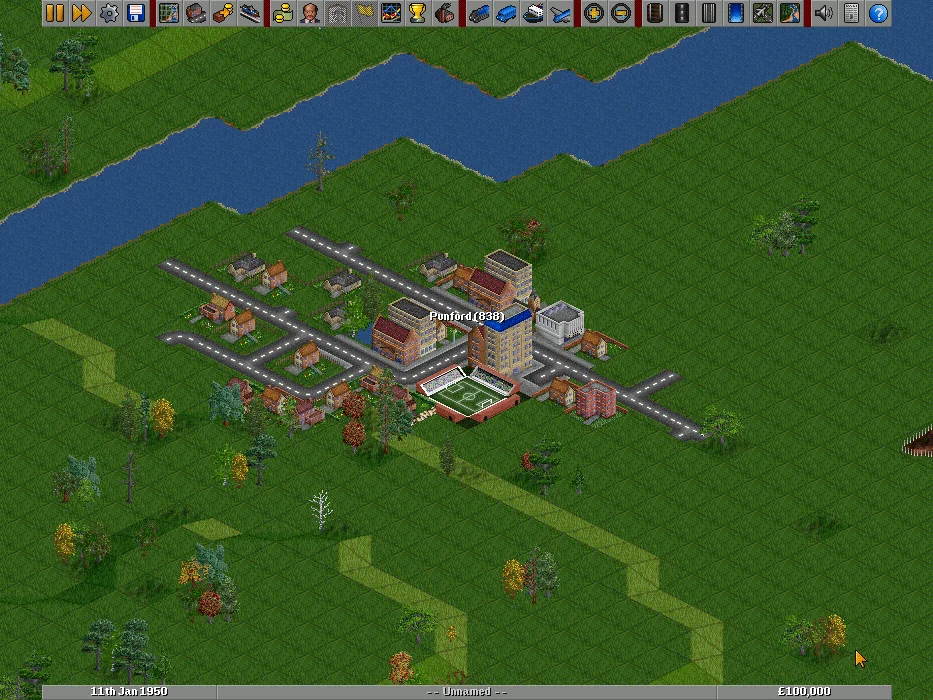
OpenTTD puts you in charge of a brand-new transport company on a randomly generated map of hills, rivers, towns and industries. You start in 1950 with a bank loan and an empty landscape, and your job is to connect things that need connecting. Towns produce passengers and mail. Coal mines, forests, farms and oil wells produce raw materials that power stations, sawmills and factories will pay to receive, and factories in turn ship goods back to the towns.
You build every piece of the network yourself: rail lines with stations, signals and depots, roads and bus stops, docks and buoys for ships, and airports for planes and helicopters. Then you buy vehicles, give them orders ("load at this station, unload at that one") and watch them run. Each delivery pays according to how much was carried, how far and how fast. Good routes earn money; bad ones quietly drain it through running costs, so a big part of the game is spotting which is which.
Time keeps moving while you build. New locomotives, buses and aircraft appear over the decades, old models wear out, towns grow around well-served stations, and industries open, close and change their output. There is no single way to win: you can chase the highest company value, build the busiest railway on the map, or simply design a network that looks good and runs smoothly.
OpenTTD began in 2004 as an open-source reimplementation of Transport Tycoon Deluxe, Chris Sawyer's 1995 game, and has grown well beyond it since, with path-based signals, cargo distribution, much larger maps and many interface improvements. It is an independent project made by volunteers; it is not the original game and is not connected with its publisher. The version here uses only the free OpenGFX graphics and OpenSFX sounds, not any of the original game's files.
Playing it here
This is OpenTTD 15.3, compiled for the browser from the official source code with the free OpenGFX 8.0 graphics, OpenSFX 1.0.3 sound effects and the OpenTTD TrueType fonts. Click Play now: the download is about 19 MB, so the first start can take a little while. The game comes in English and Brazilian Portuguese; on the first start it follows the language of this page, and you can switch later in Game Options.
This build plays offline. Multiplayer, the server list and the Online Content service (downloadable add-ons) are not available, and those buttons report that no network devices were found. There is no music, since the game's free soundtrack is in MIDI and the browser has no synthesiser to play it; sound effects work normally.
Saved games and settings stay in this browser. The game autosaves every ten minutes, and you can save at any time with F3 or the disk menu on the toolbar. Settings are written mainly when you leave the game, so quit through the main menu or the disk menu ("Exit") rather than just closing the tab. Clearing this site's data in your browser deletes your saves.
Playing on a phone or tablet is possible but awkward: a tap works as a left click, but there is no right-drag to scroll the map, so you have to move around with the minimap. A computer with a mouse is much more comfortable.
Controls
| Input | Action |
|---|---|
| Left click | use buttons and tools, select vehicles and buildings |
| Right button + drag | scroll the map |
| Mouse wheel | zoom in and out |
| Arrow keys | scroll the map |
| Esc | drop the current building tool |
| Delete | close all open windows |
| Space | dismiss a news message or error |
| F1 | pause and resume |
| F2 / F3 | game options / save and load |
| F4 or M | world map |
| F5 / F8 / F12 | towns / finances / industries |
| Shift+F7 / F8 / F9 / F10 | rail, road, dock, airport toolbars |
| Shift (while building) | show the cost without building |
| Ctrl + click | the "other" action of a tool, explained in its tooltip |
Inside the rail and road toolbars, the number keys pick tools: on the rail toolbar 5 is the easy "autorail" tool, 7 is a depot, 9 a station and S signals; on the road toolbar 3 is autoroad, 5 a depot and 6 a bus stop. Hover over any button to see what it does. Browser shortcuts such as Ctrl+W or Cmd+Q still belong to the browser, so use the menus to abandon or quit a game.
Your first profitable route
Coal by train is the classic start. Open the industry list (F12) or look around the map for a coal mine and a power station roughly 20 to 50 tiles apart. Coal is produced in large amounts and a power station accepts all you can bring, so this route pays well from the first trip.
- Open the rail toolbar (Shift+F7) and build a station next to the mine. While you place it, the highlighted area shows which industries it serves; make sure the mine is inside it. Build a second station by the power station, and check that it lists coal under "Accepts".
- Connect the two with track, using the autorail tool, and build a depot on a short spur next to one of the stations.
- Click the depot to open it, buy a locomotive and a few coal wagons, and open the vehicle's orders: "Go To" the mine station with "Full load", then "Go To" the power station. Start the train.
Buses are a cheaper first step. Find two towns close together, place a bus stop in the centre of each (from the road toolbar, Shift+F8), build a road depot, and send a bus between them. It earns less than coal, but it costs very little and teaches you how orders work.
A few things worth knowing
Watch the money. The finances window (F8) shows where your money comes from and goes. You can borrow more there when you need to build, and repay the loan once routes are earning.
Distance pays, slowness costs. Longer routes earn more per trip, but cargo loses value the longer it sits in a vehicle. Medium distances with fast vehicles are usually the sweet spot.
Use the coverage highlight. Every station only serves the tiles in its catchment area. A bus stop at the edge of town picks up far fewer passengers than one in the middle.
Signals let trains share track. One train on a line needs none, but as soon as you add a second one, put signals along the track and build passing places, or the trains will block each other.
Subsidies point to easy money. The subsidies list (F6) offers extra pay for specific new routes. They are a good hint for where to build next.
Replace old vehicles. Breakdowns grow more frequent as vehicles age. The vehicle list shows which ones are losing money, and its "Replace vehicles" option swaps an old model for a newer one the next time each vehicle visits a depot.
Credits and licence
OpenTTD is made by the OpenTTD team and a large community of contributors, named in the game's credits and in its CREDITS file. It is free software under the GNU General Public License, version 2, with some third-party components under other free licences. The OpenGFX graphics (GPL) and OpenSFX sounds (CC BY-SA 3.0) are separate free projects with their own credits. The licence texts, the credits for every sound, and the complete source code of this build with our patch are linked from this page. Official site: openttd.org.