
 Portugues
Raycast Racer
Saved games stay in this browser only.
About the game
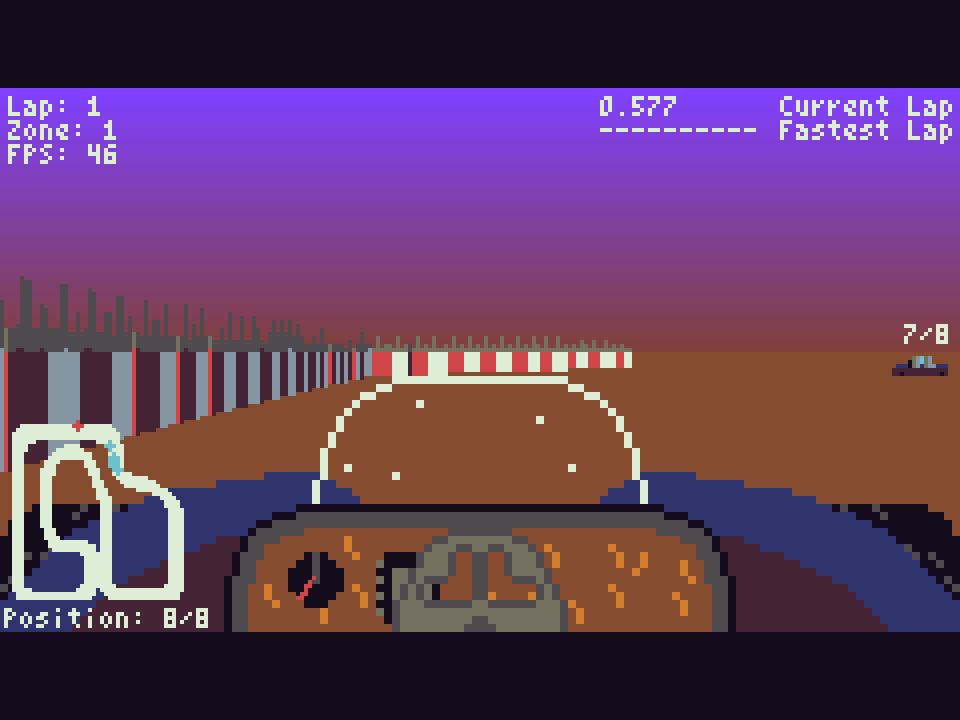
Raycast Racer puts you behind the wheel, looking out over the dashboard at a track that seems to stretch into the distance. The trick is the same one that powered the first 3D shooters of the early 1990s: the TIC-80 has no 3D hardware at all, so the game casts a ray for every column of the screen to find the walls, then scales the stands, banners and rival cars to match. The result is a surprisingly convincing circuit on a 240 by 136 pixel screen.
A race is five laps against seven computer drivers by default, with your position, current lap and best lap shown around the screen and a small map of the circuit in the corner. You start at the back of the grid, and the rivals are not all alike: some accelerate harder, others take the corners more cleanly, so winning means working your way past the whole field. There are two circuits to choose from in the menu, and you can change the number of cars from one (a lonely time trial) to eight and the number of laps as you like.
Playing it here
Raycast Racer was made for TIC-80, a fantasy console: an imaginary 1980s-style computer with a 240 by 136 screen and 16 colours, for which independent developers write new games. It runs here in the official TIC-80 web player. Click Play and press Z on "Play with current settings" to start a race.
Your best time on each circuit is saved in this browser, but only for races of the standard five laps; the menu warns you when a different number of laps turns record keeping off. If the game feels slow on your computer, open "Custom Graphical Settings": lowering the scan resolution or the view distance makes the biggest difference. Esc opens the TIC-80 menu. A gamepad works directly, and on touch screens an on-screen D-pad and buttons appear.
Controls
| Key | Action |
|---|---|
| Up arrow or Z (A button) | accelerate |
| Down arrow or X (B button) | brake |
| Left / Right arrows | steer |
| Up / Down arrows (menu) | choose an option |
| Left / Right arrows (menu) | change the circuit, number of cars, laps or a graphics setting |
| Z (A button) | confirm in the menus |
| Esc | TIC-80 menu |
A few things worth knowing
Brake before the corner, not in it. The car slides wide if you turn at full speed. Ease off on the way in and accelerate again as the track straightens.
Use the map. The outline in the bottom-left corner shows the whole circuit and every car on it, which is the easiest way to see the next bend coming.
Start small. A race with fewer cars and laps is a good way to learn a circuit before you try to beat seven rivals over five laps.
Credits and licence
Raycast Racer was created by Niklas "Nalquas" Freund, who made the code, the engine, the graphics and the circuits. It is free software under the GNU General Public License, version 3 or later. The cartridge holds the game's readable Lua source, and the author's repository at version 1.1.0 is hosted alongside the game. It runs here in the TIC-80 web player (MIT licence). The licence text and the source code are linked from this page.