
 Portugues
Flip (Simon Tatham's Puzzles)
Saved games stay in this browser only.
About the puzzle
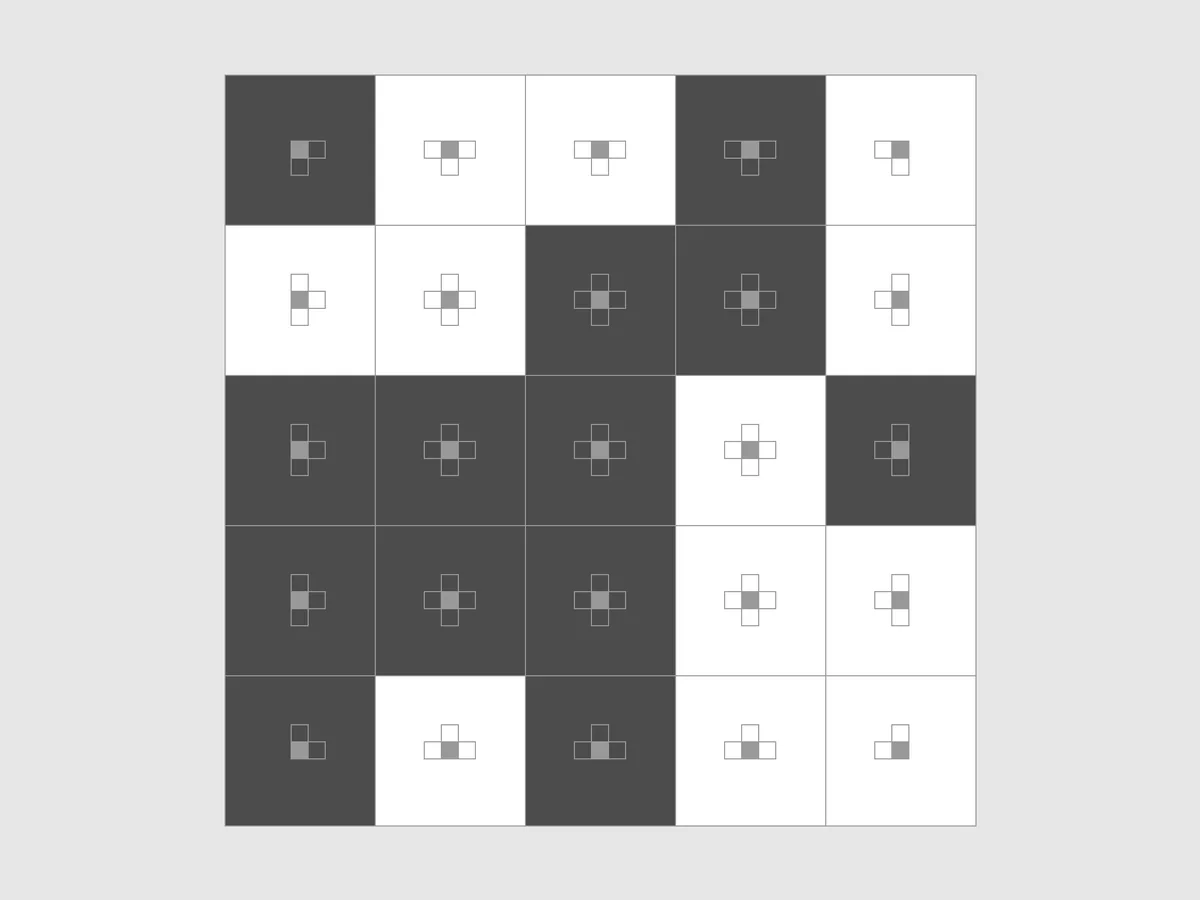
Flip is a grid of squares, some light and some dark, and the goal is to have all of them light at once. Clicking a square flips it, but it also flips a handful of other squares nearby, so fixing one corner tends to spoil another. Each square carries a tiny diagram of the group it flips, so you always know what a click will do.
It belongs to the family of puzzles often called lights out, after the handheld toy of the 1990s. Simon Tatham added it to his collection in 2005, with a second mode in which every square flips a different random shape.
Rules
- Clicking a square flips it between light and dark, together with every other square marked in its diagram.
- In the Crosses mode, each square flips itself and its neighbours above, below, left and right (fewer at the edges).
- In the Random mode, each square flips itself and its own randomly chosen group of nearby squares.
- The puzzle is solved when every square is light. Every grid the game deals can be solved.
Controls
| Input | Action |
|---|---|
| Left click | flip a square and its group |
| Arrow keys | move the cursor |
| Space / Enter | flip the square under the cursor |
| N / U / R | new game / undo / redo |
If you use Solve, some squares get a red mark: clicking each marked square once solves the grid. Clicking an unmarked square adds a mark there, because that click will then have to be undone.
How to solve it
Order does not matter, and twice is nothing. Flipping a square twice puts everything back, and the result of several clicks is the same in any order. So a solution is simply a set of squares to click once each. Think about which squares to press, not when.
Chase the dark squares down. In the Crosses mode, leave the top row as it is and work downwards: for every dark square in a row, click the square directly below it. That clears the row without touching the ones above. When you reach the bottom, only the last row can still have dark squares.
Fix the bottom from the top. The pattern left on the bottom row tells you which squares of the top row to press before chasing again. There is no simple rule for every size, but on small grids a little experimenting with the top row, followed by another chase, quickly finds the answer, and you start to remember the patterns.
Look for squares few groups reach. In the Random mode, look for a dark square that only a few groups reach. An odd number of those squares must be clicked (usually just one), and deciding which often settles its neighbours.
Count light squares only at the end. Midway through, the number of light squares says little. What matters is whether the squares you still plan to click explain the dark ones that remain.
Sizes
The Type menu has 3x3, 4x4 and 5x5 grids in both the Crosses and the Random mode. Custom sets any width and height and the shape type.
Playing here
Click Play to open the puzzle. The menu above the board has New game, Restart, Undo, Redo and Solve (which marks the squares to click in red), the Type menu with the sizes, and the Game menu, where you can type in a game ID or a random seed, download the current game as a file, load a saved file and change the preferences. Your game in progress is kept in this browser and comes back with its whole undo history the next time you open the page.
On a touch screen, tap a square to flip it.
Credits and licence
Flip is part of Simon Tatham's Portable Puzzle Collection, written by Simon Tatham with code contributed by several other authors, and distributed with its source code under the MIT licence. This page runs a WebAssembly build made by FredyGames from the author's official source snapshot, with no changes to the puzzle; the source and the build script are hosted with the game, and the licence text is linked from this page.