
 Portugues
Shogi
Saved games stay in this browser only.
About the game
Shogi is the chess of Japan, and it has one rule that changes everything: a piece you capture does not leave the game. It changes sides and waits in your hand, and on any later turn you can drop it onto an empty square instead of making a move. Because of that, shogi has no quiet endgame with a few lonely pieces; the board fills up, attacks can come out of nowhere, and the game is decided by mating nets and clever drops.
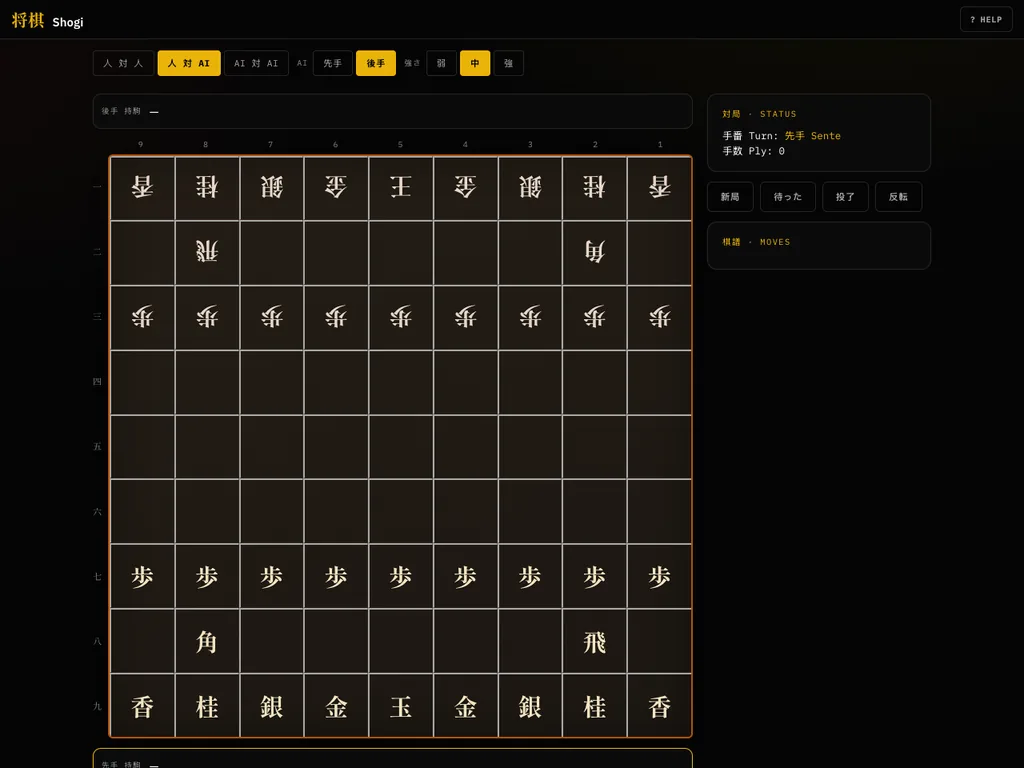
The board is a grid of 9 by 9 squares, and each side starts with twenty pieces: a King, a Rook, a Bishop, two Gold and two Silver generals, two Knights, two Lances and nine Pawns. The goal is to checkmate the opposing King. Most pieces can promote when they enter, move inside or leave the last three ranks, and a promoted piece usually becomes much stronger. This version knows every rule, including the ones that keep drops fair: no two unpromoted pawns on one file, no pawn drop that gives checkmate and no piece dropped where it could never move. Four repetitions of the same position are a draw.
This is the Shogi of the Asobi collection by Miguel Carino, an HTML5 and JavaScript program. Its code was written with AI tools, which the author states in the repository, and its licence is the AGPL. There are three modes (two people, you against the computer, or computer against computer) and three strengths for the computer, shown with the characters for weak, medium and strong. The labels on the board are in Japanese, as on a real shogi board, and the rest of the interface follows your browser language in English, Spanish, Portuguese, Japanese and Russian.
Playing it here
Click Play. By default you play the first side (Sente) against the computer at medium strength. Click a piece to see its legal moves, then click one of the highlighted squares. When a move could promote, a prompt asks whether to promote or keep the piece as it is. Captured pieces appear in the hand boxes above and below the board; click one, then an empty square, to drop it. The buttons beside the board are New game, Undo, Resign and Flip the board. The Help button (or the ? key) opens the rules, and in the computer-against-computer mode the Pause button and the P key stop and resume the play. Nothing is saved between visits.
Controls
| Input | Action |
|---|---|
| click a piece, then a highlighted square | move it |
| click a captured piece in your hand, then an empty square | drop it |
| top buttons | choose two players, one against the computer or computer against computer, your side and the strength |
| New game / Undo / Resign / Flip | start again / take back a move / give up / turn the board round |
| P or Space | pause (computer against computer) |
| ? or H | open the help screen |
| F | full screen |
A few things worth knowing
Guard your King early. A shogi attack can arrive in a few moves because of drops. Move a Gold or a Silver next to the King before you go hunting.
A captured piece is a reserve. Keep an eye on what is in your hand: a Rook or a Bishop dropped behind the enemy lines can win the game at once.
Promotion is usually right. A promoted Rook or Bishop is far stronger than the original piece, and a promoted Pawn moves like a Gold general. Promote unless there is a good reason not to.
Credits and licence
Shogi was created by Miguel Carino as part of Asobi and is released under the GNU Affero General Public License, version 3 or later. The fonts (IBM Plex, Red Hat Display and Shippori Mincho) are under the SIL Open Font License 1.1. The full source of the exact version served here is published next to the game, as the licence requires, and the licence texts are linked from this page. This version has been changed by FredyGames: the author's navigation bar and branding were replaced by a page of our own for this game alone.