
 Portugues
Project: Starfighter
Saved games stay in this browser only.
About the game
Project: Starfighter is a space shooter where the screen scrolls freely in every direction instead of along a fixed track. You play Chris Bainfield, a pilot who steals an experimental fighter, the Firefly, to fight WEAPCO, the weapons corporation that has taken over the galaxy with its fleets. The campaign takes you through four star systems, from the backwater Spirit system all the way to Earth, with radio messages and short conversations between missions telling the story as you go.
Each system has a set of planets, and each planet has a mission. Many of them are more than "destroy everything": you collect cargo pods, escort medical supply craft, clear minefields, capture enemy transports, mine ore from an asteroid belt or rescue a captured ally. A few characters join you along the way, including two wingmates who fly and fight next to you, while Kline, WEAPCO's best pilot, keeps turning up to make things difficult.
Between missions you return to a hub with the system map, your ship's status, a shop and save slots. Everything you destroy pays money, and the shop turns it into a better ship: more plasma cannons, more damage, faster fire and better cooling for the main gun, more ammunition, and secondary weapons such as rocket launchers, a laser, a charge cannon and homing missiles.
The game was created by Parallel Realities, who released it in 2003. Later, a team of volunteers took it over, replaced the graphics, sounds and music whose licenses were unclear with free ones, rebalanced it and kept it updated. The original balance is still there as the Classic difficulty.
Playing it here
This is version 2.4 of Project: Starfighter, the latest release, compiled for the browser from the project's source code. The download is about 48 MB, mostly the music, and the game plays offline once it has loaded. Saved games and settings are kept in this browser; clearing this site's data deletes them. The game is in English.
Controls
| Input | Action |
|---|---|
| Arrow keys | move the ship |
| Ctrl, Enter or Z | fire the plasma cannon |
| Space or X | fire the secondary weapon |
| Shift | switch the plasma between spread and concentrated fire |
| P | pause |
| Escape | jump out once the primary objectives are done; abandon the mission while paused |
| Mouse | choose options in the hub (the arrow keys and fire also work) |
Many other keys do the same jobs, so you can pick whatever sits comfortably under your fingers: the keypad, A, S, D, F, C and the number keys 1 to 3 all fire one weapon or the other. A gamepad works as well.
Getting started
Pick a difficulty. Start New Game lets you choose from Super Easy to Nightmare!, plus Classic, which plays like the 2003 original. Normal is a good place to start; Easy gives more room to learn the game.
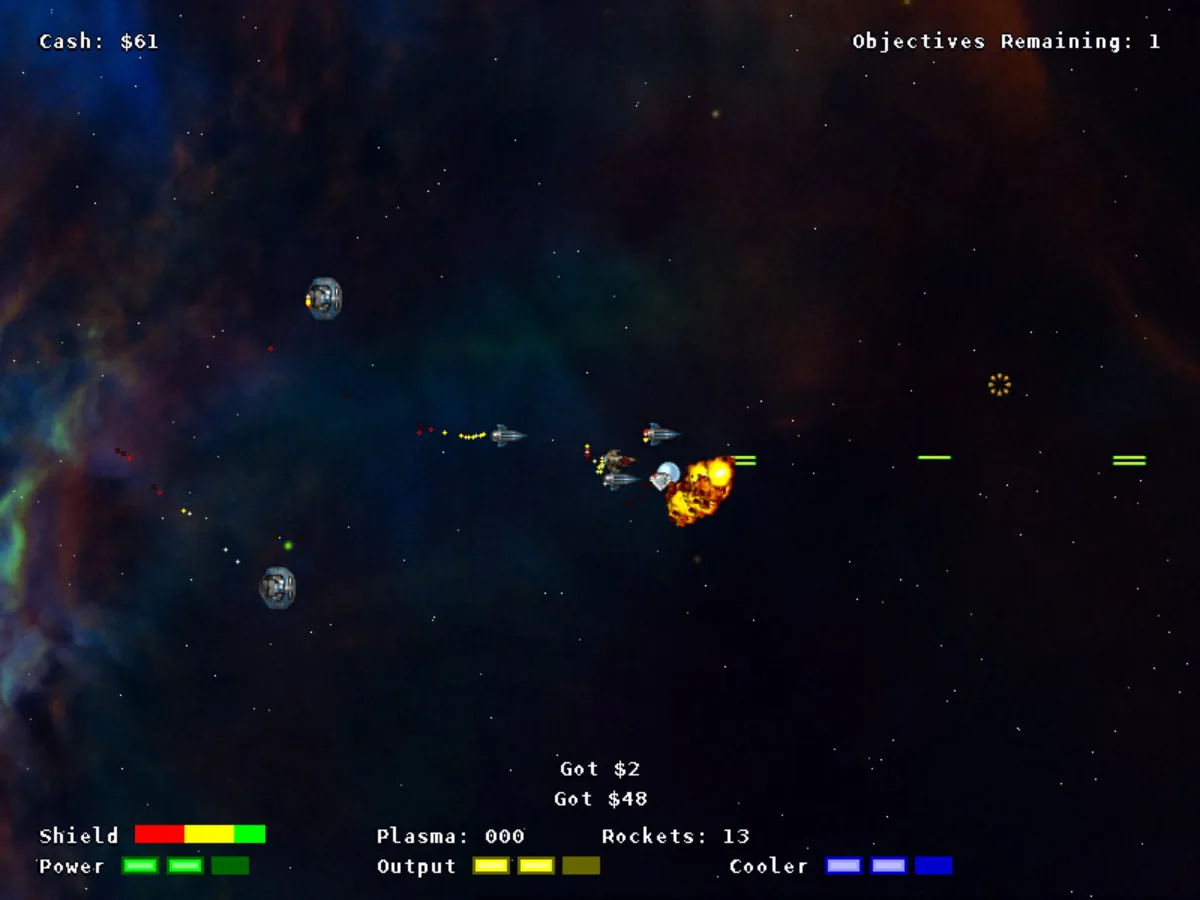
Read the mission briefing. Before each mission a screen lists the primary objectives, which you must complete, and sometimes secondary ones, which pay extra. The "Objectives Remaining" counter at the top keeps track during the fight.
Look around the hub. After a mission, the icons at the bottom of the hub lead to the system map, where you pick the next destination, the shop, your ship's statistics, the save slots and the options. Click a planet's mission to read what it asks of you.
Tips
Spread or concentrate. Once the plasma cannon fires three or more shots at a time, Shift switches between a spread of shots, good against swarms, and a tight stream that hits a single target much harder.
Mind your plasma cells. Power-ups picked up in a mission raise the plasma cannon's power, number of shots and firing rate (the Power, Output and Cooler bars at the bottom), up to the limits you bought in the shop. They run on plasma cells: when the Plasma counter reaches zero, the cannon drops back to its basic level, so grab the cells that enemies drop.
Pick up what falls. Destroyed ships also drop money, rockets and shield restores. Collecting them in the middle of a fight is often what keeps you alive.
Leave when you are ready. A mission ends by itself only when every objective is done. Once the primary ones are complete, you can stay to finish the secondary ones and collect what is left, or press Escape to jump out right away.
Save in different slots. The game autosaves, but keeping a few of your own saves lets you go back if a shop purchase or a mission goes badly.