
 Portugues
Taipo
Saved games stay in this browser only.
About the game
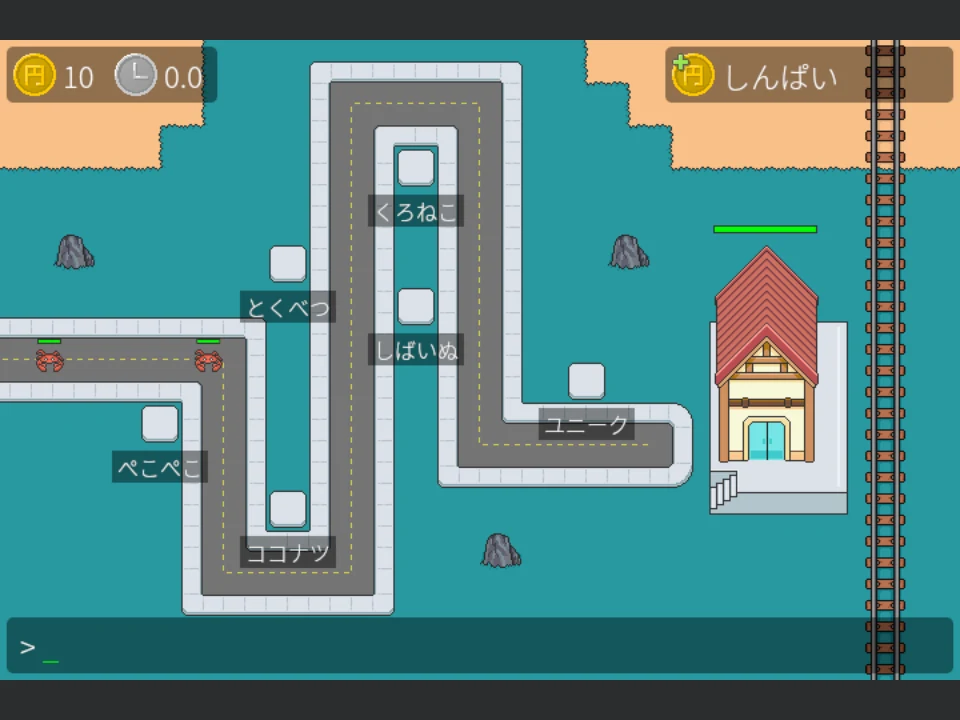
In Taipo you defend a little railway station against waves of walking monsters, and you do it with the keyboard alone. There is no mouse in the match: everything you can click in other tower defence games is a word on the screen, and to use it you type it.
The map is a winding road with empty tower slots beside it, each slot labelled with a Japanese word. Type the romaji for the label of a slot and press Enter, and the slot is selected; a panel appears with more words, which you type in the same way to build a tower, upgrade it or sell it. In the top right corner there is one more word that pays: every time you type it correctly, you earn a yen, which is how you pay for the towers. The more words you can type in the time between waves, the more defences you have when the next wave arrives.
There are three kinds of tower, a shuriken thrower that does the damage, a small dog that adds damage to the towers around it and a boss tower whose shots strip armour from enemies, and five waves of increasingly tough enemies: crabs, skeletons, snakes, a second kind of skeleton and finally a death knight. They follow the road to the station; if they reach it, its health bar goes down, and when it is empty the game is over.
The words are the point of the game. The author made it to explore the idea of controlling a game only by typing random Japanese phrases, and it works as a quick drill. The word lists you can switch on in the start menu are Kana, a mix of hiragana, katakana and loanwords, N5 Kanji, everyday vocabulary at the first JLPT level with its readings written next to the kanji, and Yamanote Stops, the stations of the Tokyo loop line. If you do not read Japanese yet, type help and press Enter: it is a hidden command that shows the romaji of every word on the screen until your next move.
Taipo was made by Rob Parrett, in Rust with the Bevy engine, and the pictures are his own pixel art and the BrowserQuest enemy sprites.
Playing it here
The game runs in the page and needs a keyboard. Click Click to play; the first start loads about 6 MB of game code and then the menu appears. In the menu you can set the volume and tick the word lists you want to practise (Kana is on by default); press Start Game and the match begins. Nothing is saved except your menu settings.
Controls
| Input | Action |
|---|---|
| Letters | type the romaji of a word on the screen |
| Enter | confirm the word |
| Backspace | delete a letter |
| Mouse | click the menu buttons and check boxes (the match itself uses the keyboard only) |
Tips
Earn first, build second. The first wave takes its time. Type the yen word in the top right corner a few times before you pick a slot, because the first tower costs 20 yen.
Slots near the bends. A tower on the inside of a corner of the road can reach two stretches of the path, so it has something to shoot at for longer.
Use help if a word stumps you. Type help and Enter, and every word shows its romaji. Note how the game spells things: a long vowel mark is typed as a hyphen and the kana for n is typed as nn.
Credits and licence
Taipo was made by Rob Parrett (rparrett on GitHub, euclidean-whale on itch.io). The code is released, at your option, under the MIT License or the Apache License 2.0. The pictures and sounds are released under Creative Commons Attribution-ShareAlike 4.0 (CC BY-SA 4.0), except the enemy sprites (crab, skeleton, second skeleton, snake and death knight), which come from the game BrowserQuest by Little Workshop (Franck Lecollinet and Guillaume Lecollinet) and are under CC BY-SA 3.0. The fonts are Noto Sans (Google) and Noto Sans JP (Adobe), under the SIL Open Font License 1.1. All the licence texts are linked from this page, together with the source and the build script.
We changed the game in one way: the English word list is not included, and a few entries of the kana list that are names of commercial brands and characters were removed. Everything else is as the author published it.
FAQ
The keys do not work. Click on the game once so that the page has the keyboard focus.
I do not know any Japanese. Can I play? Yes. Type help and Enter to see the romaji for every word, and the game becomes a typing game with strange labels.
What does the green letter mean? The letters you have typed so far turn green on every word that starts with them, so you can see what you are about to select.
Is there an English mode? Not in this version: only the Japanese word lists are included.