
 Portugues
Tau Flight Simulator
Saved games stay in this browser only.
About the game
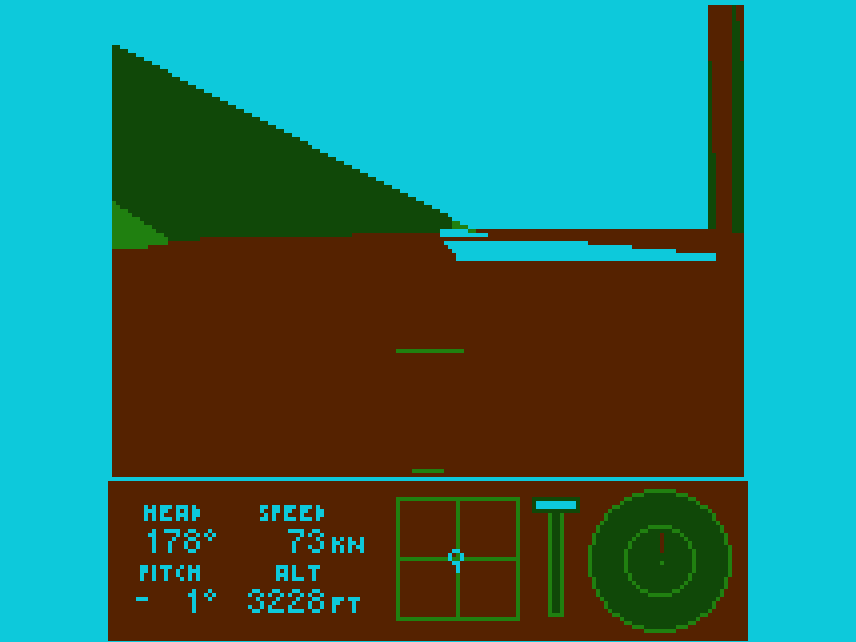
Tau Flight Simulator puts a small plane on a runway in a landscape of hills and mountains and asks you to fly it. The view is from the cockpit, drawn in solid colours with an artificial horizon, and the instrument panel sits underneath: heading, airspeed in knots, pitch, altitude in feet, a box showing where the control stick is, a throttle gauge and a round radar that marks the runways.
The plane is not a game-style aircraft that turns wherever you point it. Its behaviour comes from a physical model of the wings, the tail and the control surfaces, so it gains lift with speed, stalls when the wings meet the air at too steep an angle and has to bank to turn. A landing only counts if you touch down gently on a runway and roll to a stop; hit the ground too hard and the flight ends.
The menu offers four missions:
- take off and reach the next runway;
- land at the runway to the northwest;
- shake off a missile that is chasing you, then land;
- reach the runway in the west while staying low, under 700 feet above the ground, so the radar does not spot you.
Completed missions change colour in the menu. After a success you can go back to the menu or keep flying freely in the same mission.
Playing it here
Tau Flight Simulator was made for WASM-4, a fantasy console: an imaginary handheld with a 160 by 160 screen, four colours, a D-pad and two buttons, for which independent developers write new games. Jonathan Hähne wrote it in Zig for the second WASM-4 game jam, in August 2022, and updated it in 2023; that later version 1.0.1 is the one that runs here, in the official WASM-4 runtime. Choose a mission with up and down and press X.
The game draws its 3D view with its own software renderer, which takes a lot of processing power: the author recommends a reasonably fast desktop computer. It also uses two WASM-4 gamepads at once, the arrow keys for one and ESDF for the other, so it needs a keyboard; there are no touch controls. Nothing is saved between visits, but Enter opens the WASM-4 menu, where you can save and load the state while the page is open (2 and 4 do the same directly).
Controls
| Key | WASM-4 button | Action |
|---|---|---|
| E / D | gamepad 2, up / down | push the nose down / pull it up |
| S / F | gamepad 2, left / right | roll left / right |
| Left / Right arrows | gamepad 1, D-pad | rudder; steering on the ground |
| Up / Down arrows | gamepad 1, D-pad | more / less throttle |
| Down (held, throttle at zero) | gamepad 1, D-pad | flaps and wheel brakes |
| X | button 1 | switch the altimeter between height above ground (HGT) and sea level (ALT) |
| Z (held) + flight controls | button 2 | trim |
| Z + X | buttons 2 and 1 | reset the trim |
| Up / Down and X (menu) | gamepad 1 | choose a mission and start |
| X / Z or C (after a flight) | buttons 1 and 2 | fly again or continue; back to the menu |
| Enter | — | WASM-4 menu |
Space, V or the period key also work as X, and C or the comma key as Z.
A few things worth knowing
Small movements are enough. The controls are sensitive, and the author's own advice is that tiny inputs usually do the job. Tap the keys rather than holding them.
Watch the warnings. The screen flashes ALTITUDE when your current path will hit the ground within a few seconds, and STALL when the wings lose lift; push the nose down and add throttle to recover. BRAKING shows that the brakes are on.
Fly low to lose the missile. The author's tip: stay very close to the ground until the missile hits the terrain. It blinks on the radar, and its beeping comes from the side it is approaching from.
Use HGT for the radar mission. Switch the altimeter to height above ground with X, so you can see how much room you have under the 700-foot limit as the hills rise and fall.
Credits and licence
Tau Flight Simulator was created by Jonathan Hähne (tau-dev), who wrote the flight model, the 3D renderer and the sounds in Zig. It is released under the MIT licence, published with the source code in his repository on GitHub. The compiled game also contains the WASM-4 bindings (ISC licence), and it runs here in the WASM-4 runtime (ISC licence). The licence texts are linked from this page.