
 Portugues
Zero Velocity
Saved games stay in this browser only.
About the game
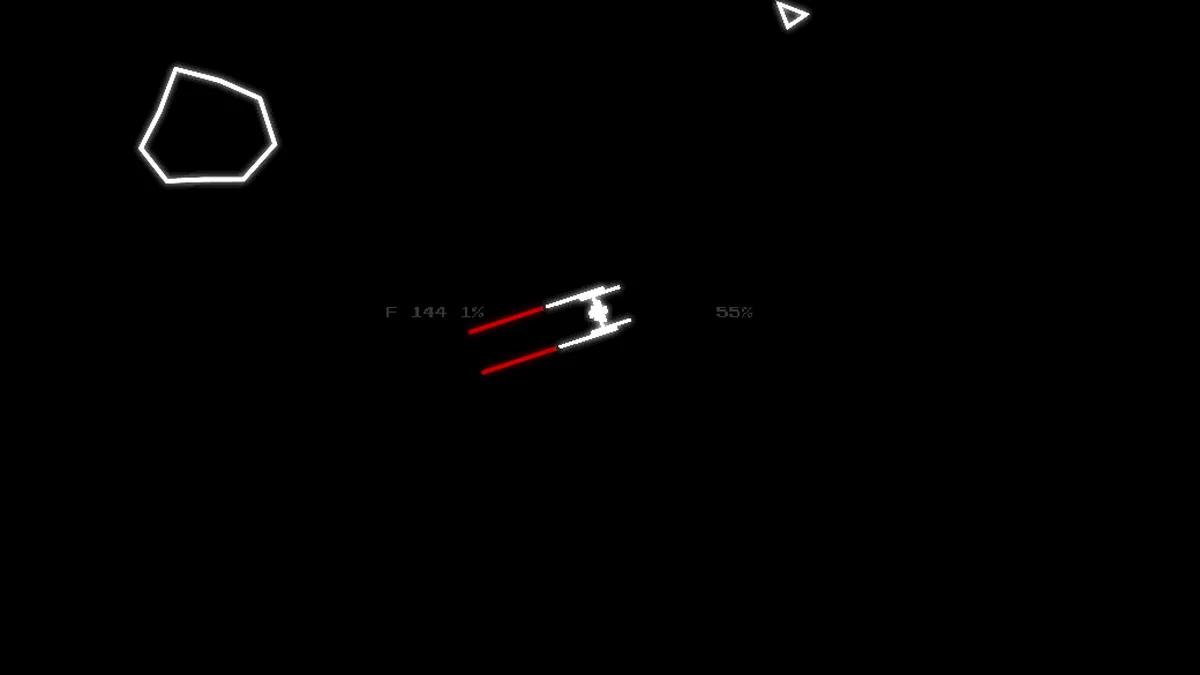
You are drifting towards a black hole with an empty fuel tank. The only way out is the hyperdrive, and the hyperdrive needs fuel, and the fuel is in the asteroids that the black hole is pulling towards you. Your ship sits fixed in the middle of the screen and can only turn on the spot; it carries two short-range mining lasers, and every burst of the lasers breaks asteroids and shaves off fuel.
That is the trade the whole game is built on. The hotter the lasers are, the more damage they do, but they heat up while they fire and, if they reach the limit, they overheat and shut down for a while, leaving you with rocks coming in and nothing to shoot them with. Lasers also burn fuel while they fire, so you cannot just hold the button down. You aim, fire in bursts, let them cool, and keep an eye on the asteroids that come in from every direction, faster and in larger numbers the longer you stay. A single asteroid that touches the ship ends the run.
The number on the left of the ship is your fuel and the percentage next to it is how close you are to the jump (10,000 fuel). The percentage on the right is the heat of the lasers. When the goal is reached the countdown of the jump starts and you must survive about ten more seconds. After you win once, the Endless mode opens, with no goal.
The game was made by Theogen Ratkin for a weekly game jam and polished in later versions: there are four ships with different damage, range, speed and heating, a screen of options (volume, bloom, pixelation, scan lines and a CRT effect), and a glow that makes the lines on the black screen shine.
Playing it here
Press Play, then Space or Enter at the title screen and on each menu to go forward. On the next screen, Space or Enter on the ship's name changes the ship, the same on the mode line changes the mode, and Start begins the run. The game saves your options (volume and picture effects) in this browser. A run is not saved: it lasts a few minutes, and if you lose you can retry at once.
The menu item that quits the program was removed from this version, since a web page has nothing to quit to. To stop, close or leave the page.
Controls
| Input | Action |
|---|---|
| A, left arrow, H or J | rotate counter-clockwise |
| D, right arrow, L or ; | rotate clockwise |
| Space or Enter | fire the lasers (also confirms in the menus) |
| M | mute the music |
| Esc, Q or Backspace | back, or the pause menu in the game |
A few things worth knowing
Fire in bursts. Damage grows with heat, so a laser that has been firing for a moment hits much harder than a cold one. The danger is the other end: at 100% the lasers overheat and stay off for a while. Letting the number on the right fall before the next burst keeps you in the safe zone.
Fuel is ammunition. Lasers burn fuel while they fire, and the fuel you collect from asteroids is what you need for the jump. With the tank at zero the lasers will not fire at all, so do not spend it on shots that miss.
Turn first, then shoot. Asteroids come from all around and the ship cannot move, so the first thing to do on each wave is to see which side is closest.
Frequently asked questions
Does it save my progress? Only the options. Each run starts from zero, and the Endless mode opens after you win the main one.
Does it work on a phone? It needs a keyboard, and we have only tested it with one.
Is it free? Yes: Zero Velocity is free software under the GNU GPL, version 3 or later, and the source code of this build is available from this page.
Credits and licence
Zero Velocity was made by Theogen Ratkin; the code is under the GNU General Public License, version 3 or later, and the graphics and the sounds of the game are under Creative Commons Attribution-ShareAlike 4.0. The music is "Underclocked", from the album Resistor Anthems, by Eric Skiff (ericskiff.com/music), under Creative Commons Attribution 4.0. The laser sound is "Electricity00" by sharesynth (CC0), the font is Press Start 2P by CodeMan38 (SIL Open Font License), and the libraries are Moonshine by Matthias Richter and classic by rxi (MIT). The build served here changes only three things (a debugging function was rewritten without a jump instruction, the full-screen request in the configuration was turned off, and the Exit item of the menu is gone); its complete source code and the patch are hosted alongside the game. The licence texts are linked from this page.