
 Portugues
Cataclysm: Dark Days Ahead
Saved games stay in this browser only.
About the game
Cataclysm: Dark Days Ahead begins a few days after the world ends. Something went badly wrong: the dead walk, strange creatures roam the woods, portals open in the sky and the army has given up on the towns it was meant to protect. You wake up somewhere in rural New England with whatever you had on you when it happened, and from there the only goal is the one you set yourself: stay alive another day.
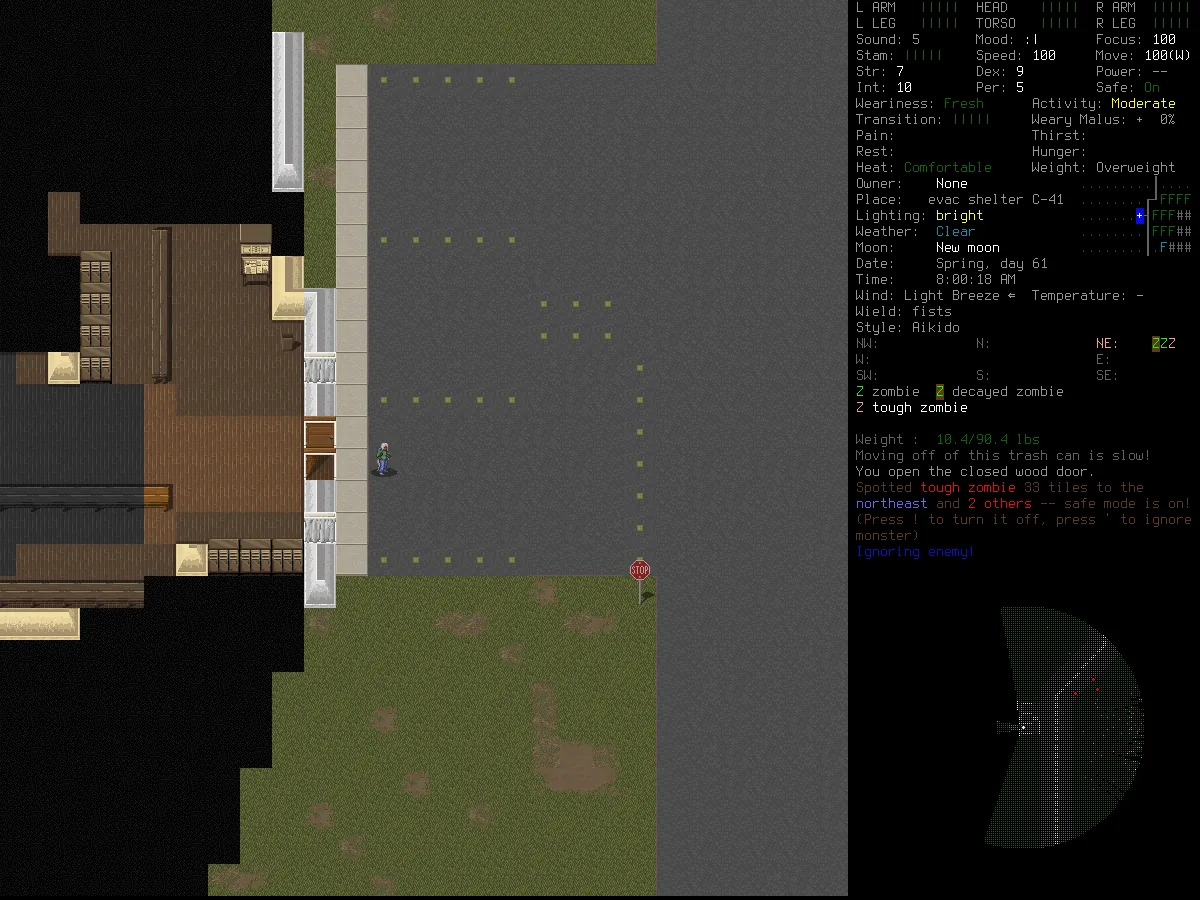
It is a roguelike in the old tradition. The game is turn-based, so nothing moves until you do, and death is final. But where most roguelikes give you a dungeon, Cataclysm gives you a whole procedurally generated region: farms, forests, rivers, small towns, cities with hospitals and gun stores, military bases, labs and much stranger places. Almost everything you see can be used. You can break down a door or pick its lock, smash furniture for planks, tear clothes into rags, siphon fuel from abandoned cars and take an engine out of one car to put it into another.
That depth is what the game is known for. Your character gets hungry and thirsty, needs sleep, feels the cold, catches infections and has to keep wounds bandaged. Hundreds of skills, recipes and books let you go from making a sharpened stick to forging steel, sewing armour, brewing medicine and welding a fortified truck together. Further in, you may find bionic implants to install or chemicals that mutate your body in unpredictable ways. There is no story to follow and no ending: other survivors, factions and quests are out there, but how you play is up to you.
The game started in 2010 as Cataclysm by Whales and has been developed since 2013 as Dark Days Ahead by CleverRaven and a large volunteer community. It is one of the most active open-source games around, and everything in it, from the code to the tilesets, is free to share under the Creative Commons Attribution-ShareAlike licence.
Playing it here
This is the stable release 0.I ("Ito"), in its point release 0.I-1, compiled for the browser from the official source code. Click Play to start: the first download is about 58 MB, and your browser keeps a copy so later starts are faster.
The game is in English and needs a physical keyboard. It shows graphical tiles by default (the UltiCa tileset); a mouse is handy for looking around but every action is on the keyboard. A phone or tablet will not work well.
Your first run
- On the main menu choose New Game. The fastest way in is Play Now! (Default Scenario), which creates a world and a random survivor in one go. To build your own character, choose Custom Character instead.
- With Custom Character, the game first asks you to create a world. The Create World screen has a name and three sliders (city size, difficulty and how many other survivors are around); the defaults are the right place to start, and F finishes. M opens the mod manager and S the advanced options, if you want to change them later.
- Character creation is a series of tabs (scenario, profession,
background, stats, traits, skills and description); Tab and Shift+Tab move
between them. For a first game:
- Scenario: Evacuee is the classic start, in an evacuation shelter with a little food and water, away from the crowds.
- Profession: Unemployed or Survivor are fine. Professions with good clothing, a tool or a weapon make the first days easier.
- Stats: Strength and Dexterity keep you alive in a fight, and Intelligence makes reading and crafting faster. Avoid very low Perception.
- Traits: some traits give points back but cost you a lot later. Fast Learner, Good Hearing and Light Step are safe picks; avoid Weak Stomach, Hates Books or anything that slows you down.
- On the last tab, type a name (or let the game pick one) and press the finish key shown on screen. The world is generated and you start.
There is also a Tutorial Game on the main menu that walks you through moving, picking things up and fighting, step by step.
Loading the game data takes about a minute every time you start or load a game (more on a slower computer), with a newspaper picture on screen while it works. To continue later, choose Load on the main menu and pick the world and the character.
Essential keys
| Key | Action |
|---|---|
| Arrows, numpad or HJKL YUBN | move (diagonals: numpad 7, 9, 1, 3 or Y, U, B, N) |
| . or numpad 5 | wait one turn |
| | | wait several minutes |
| g | pick up items here or next to you |
| / | advanced inventory (move items between the ground, containers and you) |
| i | inventory |
| E | eat or drink |
| a | use (apply) an item |
| w | wield an item as a weapon or tool |
| W / T | wear / take off clothing |
| d | drop |
| r | reload |
| f | fire the wielded weapon |
| t | throw |
| e | examine a door, a container or a piece of furniture next to you |
| o / c | open / close a door |
| s | smash something next to you |
| x | look around |
| m | world map |
| & / * | craft / build (construction) |
| B | butcher a corpse |
| R | read |
| @ | character sheet |
| " | movement mode (walk, run, crouch) |
| ! | toggle safe mode (stops you when a monster comes into view) |
| $ | sleep |
| P | message log |
| ? | list of keys on the current screen |
| Escape | menu: help, options, key bindings, save and quit |
| Shift+S | save and quit to the main menu |
Every key can be changed from the menu (Keybindings). The game asks for confirmation before anything irreversible. Browser shortcuts such as Ctrl+W or Cmd+Q still belong to the browser, so save with Shift+S before you close the tab.
Surviving the first days
Do not fight crowds. Zombies are slow alone and deadly in groups. Leave safe mode on, look around with X before you step into the open, and walk away from anything you are not sure about. Running uses stamina, so do it in short bursts.
Water first, then food. Thirst kills faster than hunger. Look for bottled water, soda and canned food in houses, and carry an empty bottle: river and lake water is safe once you boil it. Food rots, so eat the fresh things first.
Find a bag and good clothes. A backpack or a duffel bag lets you carry far more. Layered clothes keep you warm and add some protection; check the encumbrance on the character sheet (@), because too much weight and too many layers slow you down.
Make a weapon early. Even a long stick sharpened into a spear (crafting menu, &) is better than your fists. Reach weapons let you hit a zombie before it hits you. Fight in doorways and corridors so only one enemy can reach you at a time.
Treat every wound. Bleeding, cuts and bites get infected. Keep bandages and disinfectant, apply them with a, and watch the health panel on the side.
Rest somewhere safe. You need sleep. A locked house away from town with the doors closed and a bed or a sleeping bag is good enough at first. Read books in the evening: they raise your skills and teach you recipes.
Explore at the edges. The outskirts of towns hold the most loot for the least danger. Cities, labs and military sites are tempting, but they are for later, when you have armour, a better weapon and a way to escape.
How saves work
Your worlds, characters and options are kept in this browser, in the site's own storage (IndexedDB). The game saves when you press Shift+S or choose Save and quit from the menu, and every save is written to the browser storage right away. The game also keeps the world as you explore it, and the page writes any pending changes again when you switch tabs or close it. Closing the tab without saving loses the turns since your last save, as it would in the desktop game.
Like any roguelike, Cataclysm deletes a character for good when it dies. The world stays, so the next survivor can start in the same world and maybe find what is left of the previous one.
Clearing this site's data in your browser deletes your worlds and characters. Saves are not shared between browsers or devices.
What is in this build
We only publish content whose licence clearly allows it, and when in doubt we leave it out. Everything that ships with the game is under CC BY-SA 3.0, with the fonts under their own free licences, and the game's own tilesets are in: UltiCa (the default), AltiCa, Chibi Ultica, MSXotto+, RetroDays, NeoDays, GiantDays, BrownLikeBears, HollowMoon, Cuteclysm, SmashButton iso, the ASCII tileset and four overmap tilesets. Most of the optional mods from the official release are in too, from Magiclysm and Mind Over Matter to DinoMod and Innawood.
A few things from the official release are not:
- Three mods built on other people's works: Mythical Martial Arts (fighting styles taken from other franchises), The Backrooms (based on an internet legend that grew out of a third-party photo) and Xedra Evolved (written as an homage to a TV series). The parts of other mods that only apply when Xedra Evolved is loaded are left out with it.
- Left out for size: the isometric UltiCa tileset (18 MB) and the Massachusetts mod, as in the game's own web build, and the obsolete mods that the game hides anyway.
- Sound and translations: this build has no sound, and the game is in English only.
Credits and licence
Cataclysm was created by Whales; Cataclysm: Dark Days Ahead is developed by CleverRaven and hundreds of contributors, named in the game's credits. The game is licensed under Creative Commons Attribution-ShareAlike 3.0 Unported. Its tilesets are made by the CDDA-Tilesets community under the same licence, with filler trees by Yar (CC BY 3.0) and some sprites from Dungeon Crawl Stone Soup (CC0). The fonts are Terminus and VecTerminus (SIL Open Font License), GNU Unifont (SIL Open Font License and GPL with the font embedding exception) and Roboto (Apache License 2.0). The browser build uses the game's own Emscripten support; the licence texts and a copy of the source of this build, with our patch and build scripts, are linked from this page. The hosted source is the official 0.I-1 release without the three mods above and without the translation files (which contain their text); it builds exactly the game served here. Official site: cataclysmdda.org.