
 Portugues
Final Bastion
Saved games stay in this browser only.
About the game
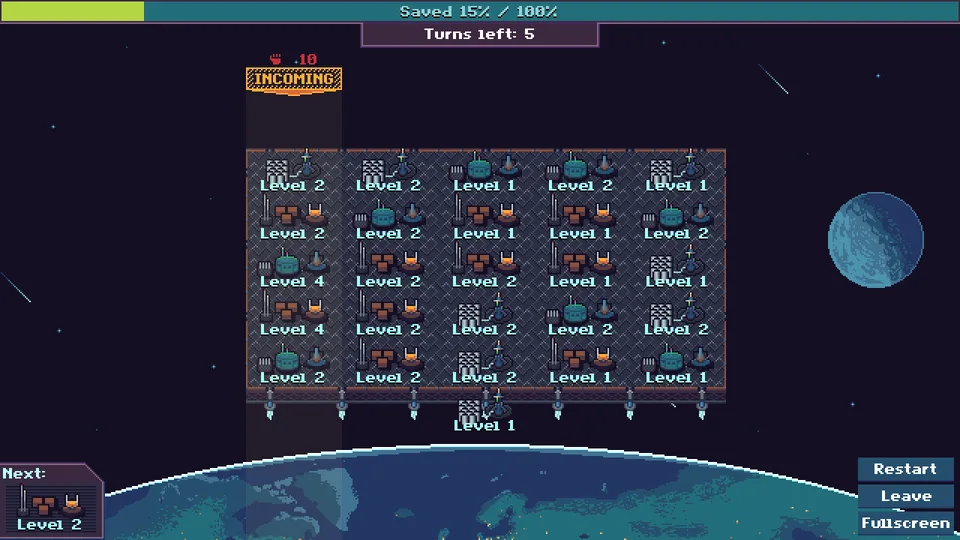
Huge storms of meteoroids are heading for Earth, and the planet is being evacuated. You command the Final Bastion, a small platform with a board of turrets between the rocks and the people. The game mixes two ideas that do not often meet: the sliding and merging of a number puzzle, and the lanes of a tower defence game.
Every turn you get one new turret and push it in from an edge of the board. It shoves the turrets already in that row or column one step along, so where you place it decides what moves. When the turret you push meets one of the same type and level, the two merge into a stronger one. A counter shows how many turns are left until the next storm, and a marker above one of the five columns tells you how strong the attack is and where it will come in. The storm eats through the turrets in that column from the top; if it still has strength left after the last one, the rest hits the Earth and people are lost. Destroyed turrets are replaced at once, so the board never empties, but every storm is stronger than the one before. A bar at the top shows how many people you have saved out of those still alive, and the game ends when the two numbers meet.
It is short and easy to learn, and a tutorial explains the whole idea in a couple of minutes. After that it is a game of planning two or three moves ahead, so that a strong turret is waiting in the right column when the counter runs out.
Playing it here
Click Play and wait for the game to load (about 26 MB, downloaded only when you press the button). Everything is done with the mouse. Start with the tutorial: the button for a new game unlocks after you have finished it. In a game, the buttons in the lower right corner restart it, leave to the menu or switch to full screen.
Controls
| Input | Action |
|---|---|
| Mouse over the edge of the board | shows where the next turret would go |
| Left click | pushes the turret in and slides the row or column |
| Buttons in the corner | restart, leave, full screen |
Tips
Watch the marker. It shows which column is attacked and how hard. Keep your strong turrets in that column and use the other turns to prepare the next one.
Merge before the storm. Two turrets of the same type and level become one of the next level, which absorbs much more of an attack than the two together.
Think about what moves. Each push slides a whole line. Work out what will end up next to what before you click.
FAQ
Does it work on a phone? It is built for a mouse, so it is awkward on a touchscreen.
Is my progress saved? The game remembers in your browser that you have finished the tutorial. A game in progress is not saved.
How do I leave a game? Use the Leave button in the corner. The game has no quit button on the web.
Credits and licence
Final Bastion was made by mago for Open Jam 2019 using only free software, and runs on Godot Engine 3.2.2 (the authors used 3.1.1). The game, its art, its sound effects and its fonts are under The Unlicense (public domain). The soundtrack is by Rafael Krux, released under Creative Commons Zero. Nothing is required of you, but the credit is well deserved.
This version only removes the author's social media handles from the menu footer, hides the menu's quit button (a browser ignores it) and leaves out files the game does not use (drawing sources, store page images and a colour palette). Nothing else was changed. The complete source of this build and the licence texts, including the notices of the Godot engine, are linked from this page.