
 Portugues
Galdr
Saved games stay in this browser only.
About the game
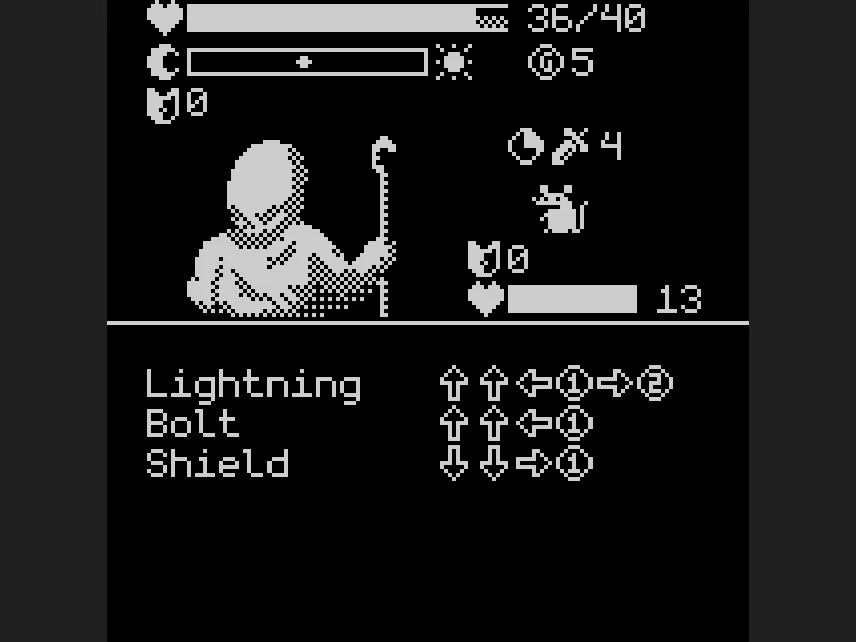
Galdr is a small roguelike that turns a controller into a spellbook. Instead of choosing "attack" from a menu, you cast a spell by pressing a short sequence of directions and buttons: for example Bolt is up, up, left and X, and Shield is down, down, right and X. The list of spells you know sits at the bottom of the screen, together with the input each one needs.
The twist is that your input counts for every spell at once. Two spells that start with the same presses will both progress as you type, so a spell that ends with another spell's sequence is cast as a bonus. Building a spellbook with sequences that overlap in the right way is the real strategy, and it is the reason the game is more than a button-masher.
A run starts with a prophecy about an eclipse and a choice between the Moon and the Sun, which decides your first three spells (Fireball, Ash and Shade for the Moon; Lightning, Bolt and Shield for the Sun). After that you travel along a road, choosing a path at each crossroads: a fight with a soldier, a wizard camp, a shop, or one of the random events the game is built around (the author counts more than forty, spread over nine areas, with an Eclipse at the end). Fights are in real time. Enemies have their own timer and strike on their own, so you have to type fast and also think about what to cast next. Your health, a bar that slides between a moon and a sun as your choices tip you one way or the other, and a purse of coins are shown at the top.
Your spellbook has limited room. When it is full the game will not let you leave a place until you decide what to drop, and some paths cost money, so every purchase is a choice.
Playing it here
Galdr was made for WASM-4, a fantasy console: an imaginary handheld with a 160 by 160 screen, four colours, a D-pad and two buttons, for which independent developers write new games. The author made it for the second WASM-4 game jam, in 2022. It runs here in the official WASM-4 web runtime and is only about 45 KB.
The menu has three entries: Tutorial (Z), Start Game (right, then X) and Options (left, then X). The tutorial is short and explains exactly how input and spells work, so play it once. The game remembers its options in this browser; a run itself is not saved, so each visit starts a fresh one.
Controls
| Input | Action |
|---|---|
| Arrow keys | the directions in a spell sequence; move through menus |
| X (button 1) | the button press in a spell sequence; confirm |
| Z (button 2) | the second button in a few spell sequences; start the tutorial |
| Enter | WASM-4 menu (pause, reset, save and load the emulator state) |
On a phone or tablet, the WASM-4 runtime shows touch buttons on the screen.
Tips
Press and release. A step of a sequence is a press followed by a release. Pressing too fast or holding a button down is the usual reason a spell does not fire.
Read the whole list. The prompts at the bottom show every sequence you can complete. Look for spells whose sequences share a start, since typing one will advance the others.
Watch the clock. Enemies show a clock icon next to their attack. Defend before the timer runs out, then heal when the fight is quiet.
FAQ
Is it a long game? A full run crosses nine areas, so it takes a good while, but you can stop at any time with the page closed. Nothing is saved except the options.
Why does the text look like a terminal? The game uses its own small monospaced font (Monogram by datagoblin, public domain) instead of the WASM-4 default one.
Credits and licence
Galdr was written by Jonathan Derque. The code is released under the MIT licence. The sprites come from the Scroll-o-Sprites by Quale, released under the Creative Commons Attribution 3.0 licence (https://creativecommons.org/licenses/by/3.0/), converted for WASM-4 by the same author; the game credits Quale on its own credits screen. The font is Monogram by datagoblin, in the public domain. The cartridge was compiled from the author's source code without changes. The licence texts are linked from this page.