
 Portugues
Scrap Spaceship
Saved games stay in this browser only.
About the game
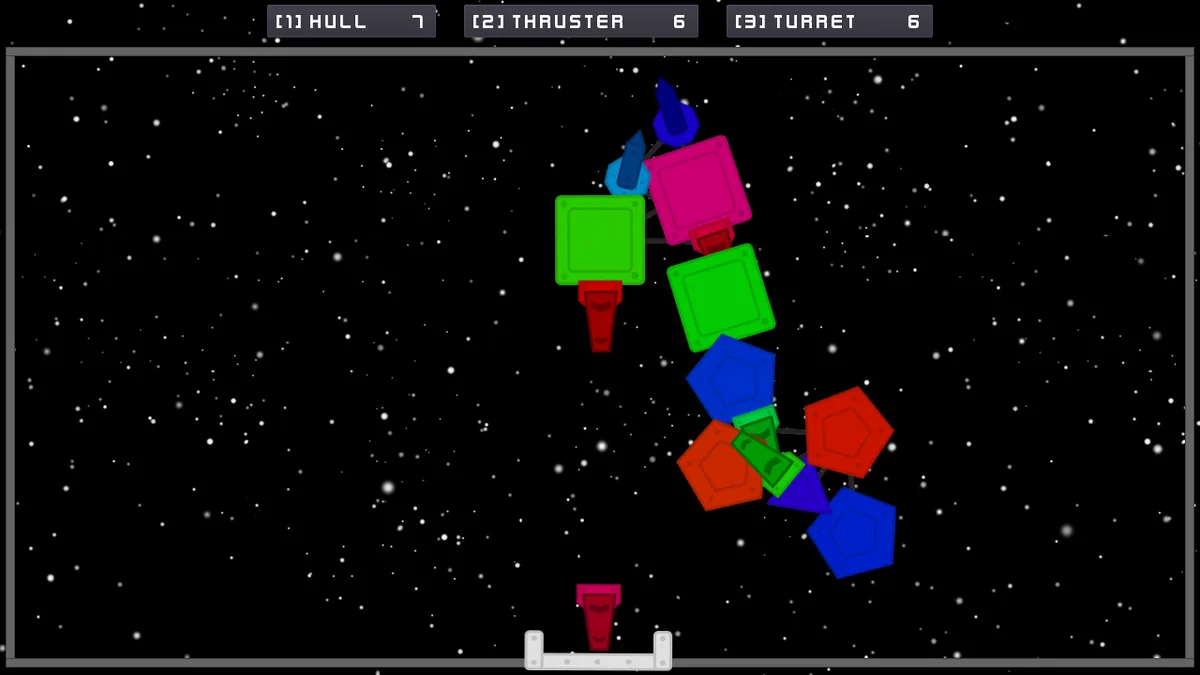
You start with nothing: an empty shipyard and a pile of scrap. The game gives you 15 hulls, 10 thrusters and 8 turrets, and the job is to stick them together into something that flies. You pick a part, aim the little constructor at the spot where you want it, and fire the part at your ship. It sticks wherever it lands, so the ship grows into a lopsided, colourful tangle that is entirely your own work.
Then you launch it, and the design is tested at once. Thrusters push in the direction they point, all of them at the same time, so a ship with thrusters on only one side can only go one way, and one with a badly balanced set will spin. The turrets on the hull fire at the mouse, but only the ones whose cooldown is over. Out there, the enemy is a field of automatic turrets that appear around you as you move, and every one you destroy adds to your score. The longer you survive, the closer they are packed and the tougher they get. Hits knock parts off your ship, which then flies a little worse, until nothing is left.
It is a game of dumb, honest physics and of improvised engineering: the ship is never pretty, and the fun is in learning what a lopsided one can and cannot do. It was made for Ludum Dare 45, whose theme was "Start with nothing".
Playing it here
Click Play, then "Start Game". While you build, the game shows short hints: click to release a part, W, A, S, D to move around the shipyard, 1, 2, 3 to switch parts and L to launch. In flight, hold Space to fire the thrusters, hold Shift to brake and hold the mouse button to fire. Esc opens the pause menu.
The game runs in the Godot engine, compiled to WebAssembly. In this version the "Quit" buttons are hidden and the links in the credits screen do nothing, because the games here never open other pages. Your high score is saved in this browser.
Controls
| Input | Action |
|---|---|
| W, A, S, D | move the constructor around the shipyard |
| 1, 2, 3 | choose hull, thruster or turret |
| Click, or Space | release the part toward your ship |
| Mouse wheel | change the colour of the part |
| L | launch the ship |
| Space (in flight) | fire the thrusters |
| Shift (in flight) | inertial brake |
| Mouse, hold the button | aim and fire the turrets |
| Esc | pause menu |
| F11 | full screen (also a button on the title screen) |
A few things worth knowing
Build a ship that can turn. Thrusters fire together, so put them where they push the ship the way you want to go, and keep some on both sides if you want to change direction by letting the ship spin.
Do not spend every part. The ship becomes heavier with every hull, and heavy ships need more thrusters to move at all. A smaller ship that moves is better than a large one that does not.
Keep moving. The enemy turrets appear in front of your speed, so a ship that sits still sees almost none, and one that stays idle for a minute loses the run.
Use the brake. Space has no friction, and Shift stops you quickly so that you can line up a shot.
Frequently asked questions
Can I win? No. It is a score game: the number in the corner is the total health of the turrets you have destroyed.
Is my progress saved? Only the high score, in this browser.
Does it work on a phone? No: it needs a keyboard and a mouse.
Is it free? Yes. The code is under the MIT licence, and the art and sounds are under free licences, listed below.
Credits and licence
Scrap Spaceship was made by Nisovin (Justin Baker) for Ludum Dare 45, in October 2019, and the code is under the MIT licence. The ship art is by Nisovin (CC0), the space background is "Parallax Space Scene" by LuminousDragonGames (CC0) and the font is Kenney Future Narrow by Kenney (CC0). Sound effects: Kenney "Digital Audio" and "UI Audio" and rubberduck "50 CC0 retro / synth SFX" (all CC0); "Energy Drain" by qubodup and "Thrusters Loop" by DJT4NN3R (CC BY-SA 3.0); "4 projectile launches" by Michel Baradari (CC BY 3.0). Music: "Inspired" and "Werq" by Kevin MacLeod (incompetech.com), licensed under Creative Commons: By Attribution 4.0. The build served here changes only the hidden Quit buttons and the credits links; the full licence texts and the author's credits file are linked from this page.